
Exporting WordPress posts, custom posts, or WooCommerce products to CSV is often useful. For example, if you run a WooCommerce store then exporting products to CSV helps you to be compatible with other suppliers. You may need to do this daily, so it’s important that it’s easy.
Shopify note: Setary’s export tool is identical whichever platform you’re connected to, so this process is the same for Shopify and WooCommerce.
Fortunately you can easily export to CSV directly from the Setary spreadsheet editor.
1. Select the items to be exported
Setary allows you to export the filters that are set on your content. This makes export hugely flexible, as you can simply export the products which are currently visible in the spreadsheet. You can also show/hide columns if you do not want to export these too. This allows you to create truly unique exports based on the type of data you’d like.
2. Select all or manually tick the items
Now you’ve filtered your content library, you can tick top left and select all, or manually select individual items within the filtered results.
3. Select Export
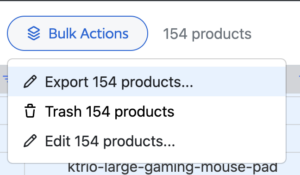
For the third and final step to exporting your products, simply click BULK ACTIONS and then EXPORT. Now your export will run with a progress bar, until all products that are selected are ready to download as a CSV file.
It really couldn’t be any easier to export products. You’re already familiar with how Setary works and how you can filter product data, and it’s a simple 1 click export from there! We hope this makes your WooCommerce Product Management easier.