
Setary now works as a complete WordPress bulk editor. You can edit posts, pages, media, and any custom post type from a single spreadsheet view.
WordPress sites grow fast. Before long, you have hundreds of blog posts, dozens of landing pages, and custom post type records that all need updating. The native WordPress admin makes that harder than it should be.
Today we’re announcing a major expansion to Setary. It now works as a full WordPress bulk editor, covering posts, pages, media, and any custom post type registered on your site. If you already use Setary to bulk edit WooCommerce products, the new features are already in your dashboard at no extra cost 🎁
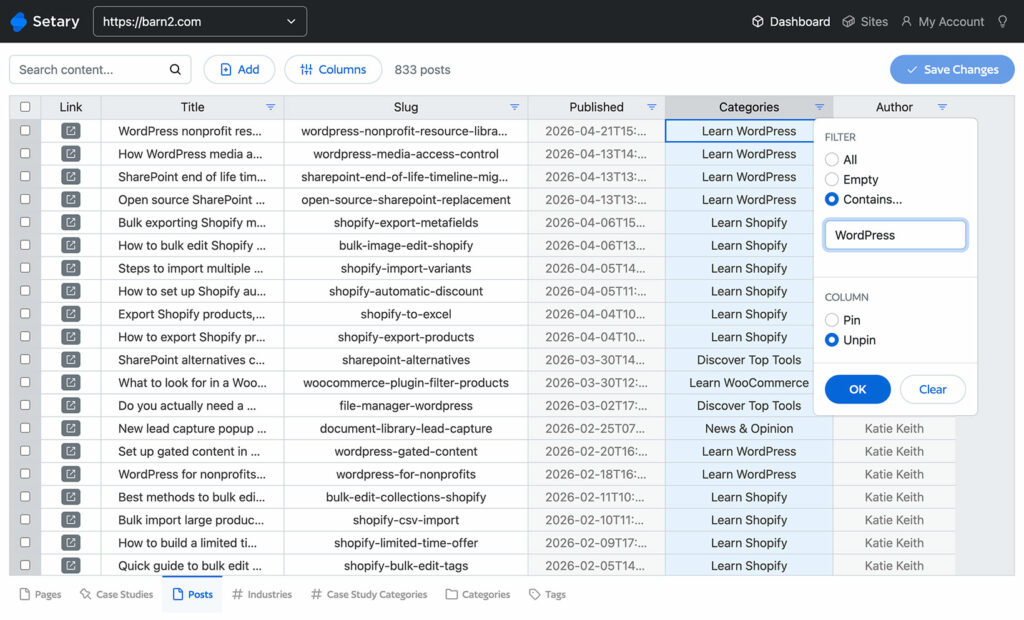
This post explains what’s new, who the new WordPress bulk editor is for, and how to start using it.
The WordPress Admin Wasn’t Built for Bulk Editing
WordPress ships with a basic bulk edit panel. It covers status, category, tags, and author. That’s roughly it.
Custom fields, SEO metadata, and anything added by a third-party plugin are not there. For sites with more than a few dozen posts, that limitation adds up fast.
Changing a category across 200 posts becomes a tedious manual task. Updating alt text on every image takes hours. The native tools were never designed for content management at scale.
What Setary Does
Setary is a WordPress bulk editor that presents your content as an editable spreadsheet. You pick a post type from the tabs at the bottom of the dashboard, and your content loads as rows and columns.
Every row is a record. Every column is a field. You edit directly in the grid, and changes apply across multiple rows in real time.
Because Setary runs as a SaaS app rather than inside the WordPress admin, it loads instantly even on large sites. You’re not waiting for slow admin screens to refresh after every change.
What’s New: Every WordPress Post Type, Not Just Products
Until now, Setary only worked with WooCommerce products. That covered a lot of ground for store owners but left out everyone running content sites, membership sites, and custom post type setups.
From today, Setary supports every standard WordPress post type and any custom post type registered on your site. That includes posts, pages, media, products, coupons, events, courses, listings, staff profiles, portfolio items, and anything else your theme or plugins have created.
All data fields are editable. That includes title, content, status, date, slug, and featured image. It also includes custom fields added by plugins like Advanced Custom Fields, Pods, and Yoast SEO. Categories, tags, and any custom taxonomies are fully supported.
What You Can Now Bulk Edit
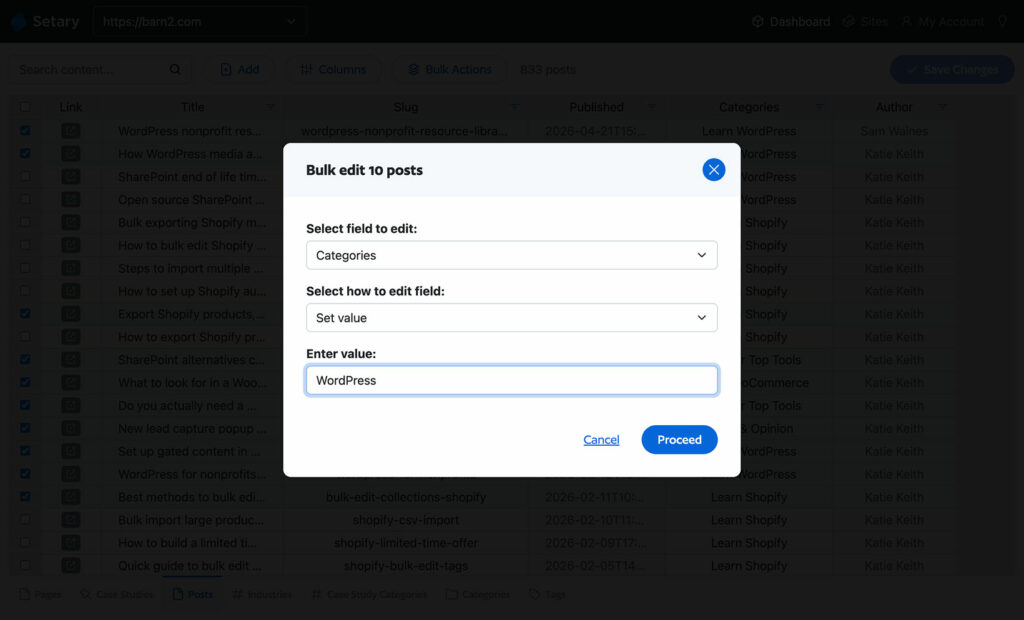
The expanded post type support unlocks a lot of practical workflows. Here are some of the most useful.
Update Hundreds of Blog Posts at Once
Reassign authors after a team change. Update categories and tags across an entire archive. Edit SEO meta titles and descriptions in bulk without clicking into each post.
Fix Every Image’s Alt Text Without Clicking In
Bulk updating alt text, captions, and descriptions on media library items is one of the most tedious jobs in WordPress. Setary loads your full media library as a spreadsheet so you can fix accessibility and SEO issues across hundreds of images in one session.
Manage Events, Courses, Listings, and Other Custom Post Type Data
Custom post types are where Setary’s expanded scope is most valuable. A few examples:
- Events registered by plugins like The Events Calendar. Update venues, organizers, or dates across multiple events at once.
- Courses and lessons from LMS plugins like LearnDash. Update course status, instructor fields, or lesson order in bulk.
- Properties or listings. Update prices, locations, or availability across a full property portfolio.
- Staff or team members. Reassign job titles, departments, or custom taxonomies across a directory.
- Portfolio items. Reassign categories, update client names, or change visibility status across a full portfolio.
Edit Custom Fields From ACF, Pods, and SEO Plugins
Most serious WordPress sites depend on custom fields. Setary reads and displays custom fields registered by any plugin and lets you edit them directly in the spreadsheet.
That covers Advanced Custom Fields, Pods, Meta Box, and the meta fields added by Yoast SEO, Rank Math, and similar tools.
Bulk Edit WooCommerce Product Categories, Tags, Attributes, and Taxonomies
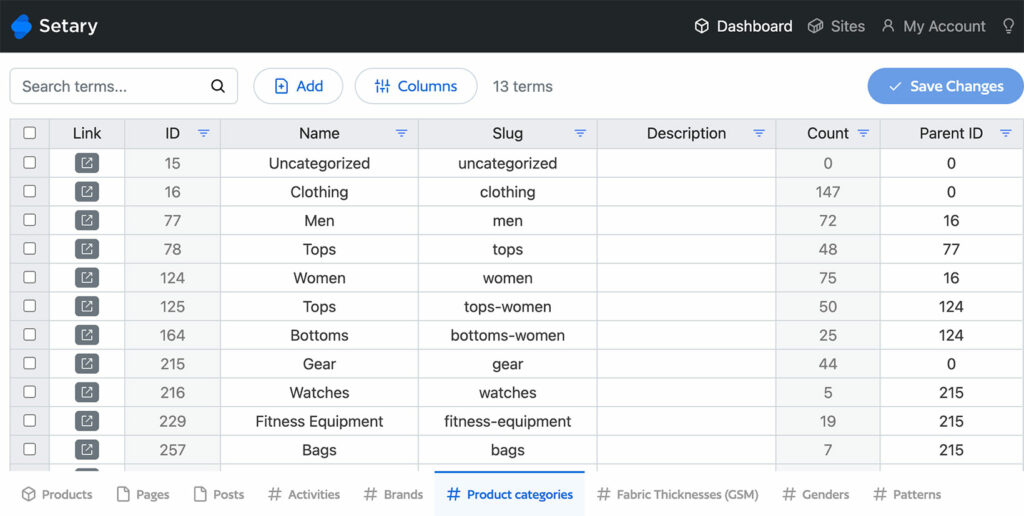
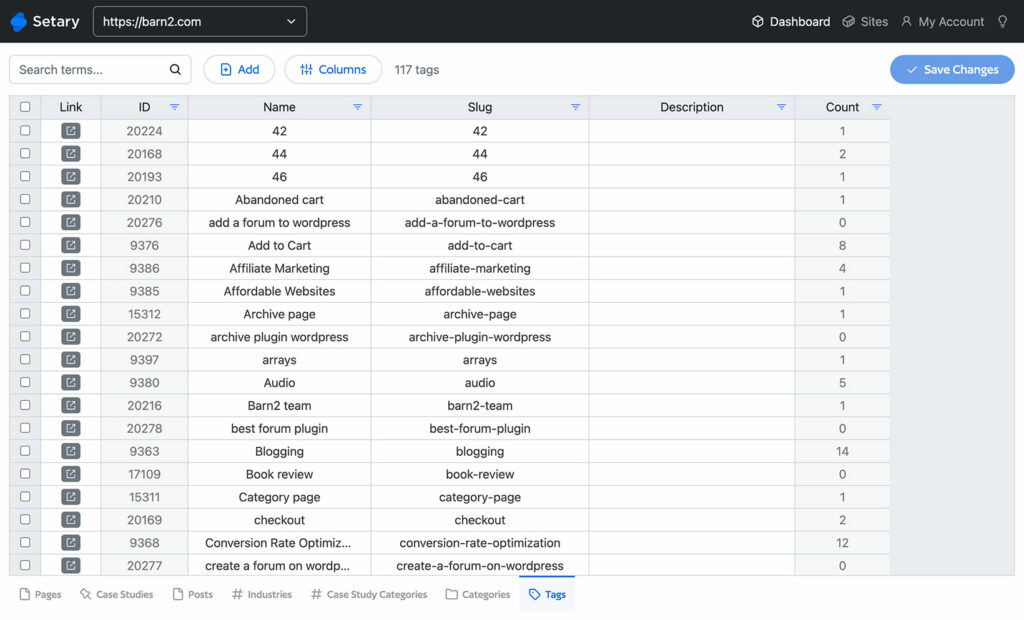
The latest update even includes some extra features for WooCommerce. For the first time, you can now bulk edit your WooCommerce product categories, tags, attributes, and taxonomies, each of which get their own view in the Setary spreadsheet editor.
Plus Everything You Already Do With Products and Coupons
Setary still does everything it did before for WooCommerce stores. Bulk update prices, stock levels, descriptions, SKUs, categories, and product attributes across hundreds of products. Coupon management works the same way.
Already a Setary Customer? Here’s How to Activate the New Features
If you already subscribe to Setary, the new post types are included in your existing plan at no extra cost. To switch them on:
- Go to Settings > Setary in your WordPress admin and tick the post types and taxonomies you want to bulk edit.
- Then open the Setary app as usual, and the new content types will appear as tabs along the bottom of the spreadsheet alongside Products.
Frequently Asked Questions
How Is Setary Different From WordPress’s Built-In Bulk Editor?
The built-in bulk editor only covers a handful of fields like status, category, tags, and author. Setary edits every field, including custom fields and SEO metadata, and presents everything as a spreadsheet so you can see and edit hundreds of records at once.
Does Setary Work With Custom Fields From ACF or Pods?
Yes. Setary reads and displays custom fields registered by any plugin, including Advanced Custom Fields, Pods, Meta Box, and SEO plugins. You can edit those fields in bulk from the spreadsheet view.
What Custom Post Types Are Supported?
Any post type registered on your WordPress site. That includes post types created by themes, plugins, or custom code. Each post type appears as its own tab in the Setary editor.
I’m Already a Setary Customer. Do I Need to Upgrade?
No. The new WordPress post type features are included in your existing subscription at no extra cost. They appear automatically as tabs in your Setary dashboard.
Will Setary Slow Down My WordPress Site?
No. Setary runs as a SaaS app outside your WordPress admin, so it doesn’t add load to your server or slow down your site for visitors.
Try Setary on Your WordPress Site
If your WordPress site has more than a handful of posts, pages, or custom records that need periodic updating, a dedicated WordPress bulk editor saves real time. The native WordPress tools simply weren’t built for it.
Setary is free to try. Connect it to your site and start editing any post type from a spreadsheet without any configuration overhead.
Bulk edit anything in WordPress, WooCommerce and Shopify
Try our demo now and discover how you could save thousands of hours managing your site.
or try the demo