
Clicking through lots of product pages kills conversions. The default WooCommerce grid layout works for visual shoppers, but when customers already know what they want or need to compare specifications quickly, those extra clicks create frustrating friction.
WooCommerce product table plugins solve this by letting shoppers view hundreds of products on a single page. They can compare data side by side, make quick buying decisions, and then add multiple items to cart with just a few clicks. This transforms the experience for wholesale buyers, technical product sellers, and stores where specifications matter more than glamorous photography.
In this guide, I’ll walk you through everything you need to know about table plugins including our top pick, WooCommerce Product Table by Barn2. We’ll compare the best plugins available, and help you choose the right one for your store.
What Are WooCommerce Product Tables?
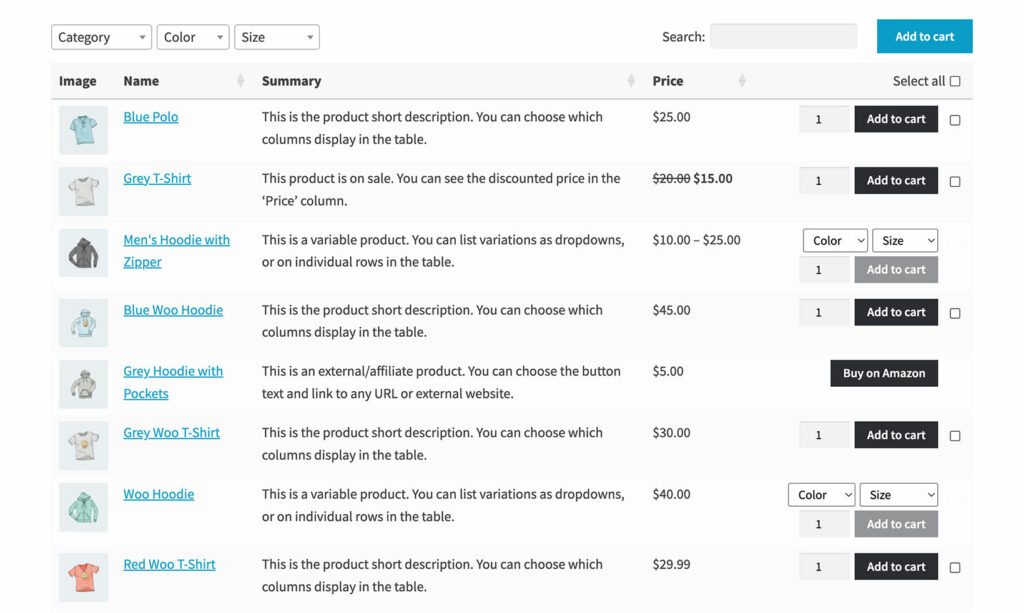
A WooCommerce product table is a searchable, sortable layout displaying products with their key data in rows and columns. Each row represents a product, while columns show specific information like SKU, price, stock level, or specifications. The best product table plugins also include a ‘Buy’ column containing variant pickers, quantity fields, and add to cart buttons – thereby enabling true one-page shopping.
Unlike standard WooCommerce grids that prioritize large images, product tables emphasize information and data. Customers scan hundreds of products at once, sort by any column, search for specific SKUs, and filter by categories without leaving the page.
Key features include sortable columns (organize by price, stock, name), advanced search and filtering (find products by SKU or specifications), multi-select add to cart (check boxes next to products for bulk ordering), customizable columns (show any product data including custom fields), variation support (display options without dropdown menus), and AJAX loading (handle thousands of products without performance issues).
Why Your WooCommerce Store Might Need Product Tables
WooCommerce product tables excel when specifications matter more than visual presentation. They deliver measurable benefits for the right use cases.
Speed and efficiency eliminate navigation friction. Wholesale buyers restocking 50 regular SKUs can complete orders in minutes rather than hours of clicking through individual pages.
Better product comparison happens naturally when specifications display side by side. For example, customers can compare four cables with different amperage ratings, lengths, and connectors becomes instant instead of juggling multiple tabs.
Higher conversion rates result from the reduced friction. Each unnecessary click represents a chance for customers to abandon their purchase. As a result, product tables streamline the path from browsing to checkout.
Professional B2B experience matters for business customers. Wholesale buyers and procurement officers expect efficient interfaces, not persuasive product descriptions and lifestyle photography. They need SKUs, specs, and prices in scannable format.
Product tables particularly excel for wholesale/B2B stores (bulk ordering), technical products (specification comparison), restaurants (online menus), digital downloads (compact listings), and any store where repeat customers know exactly what they want.
Best WooCommerce Product Table Plugins
Choosing the right WooCommerce product table plugin significantly impacts the end result. The plugins below represent the best options available, each with specific strengths and use cases. I’ve tested all of them on real stores and can provide insight beyond marketing claims.
WooCommerce Product Table by Barn2
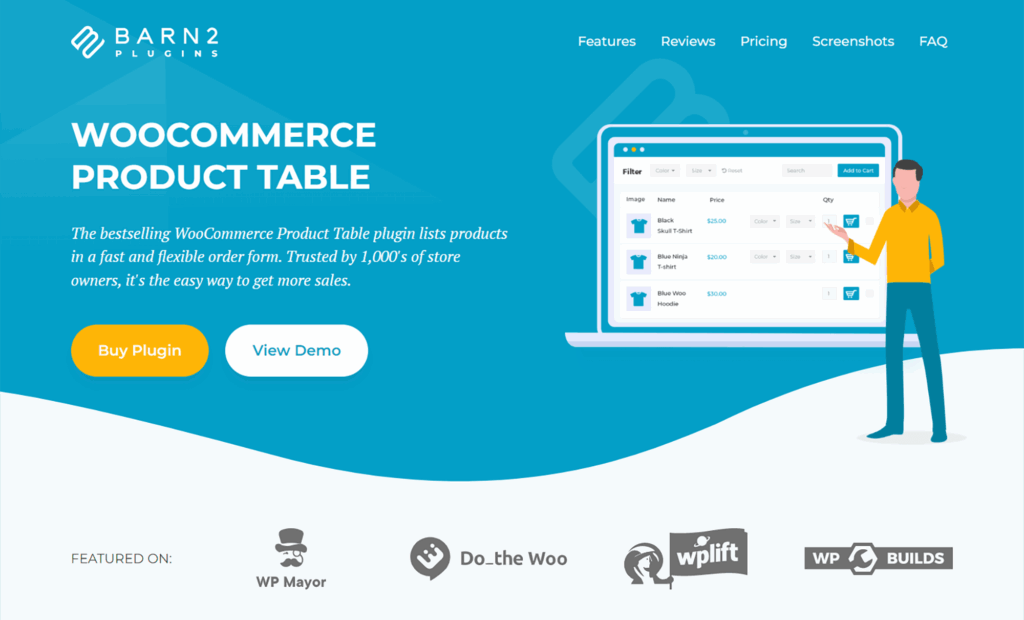
Why it’s our top recommendation: WooCommerce Product Table by Barn2 offers the most comprehensive feature set, best documentation, and highest plugin compatibility in the market. After testing every major product table plugin, this one consistently delivers the best combination of power, ease of use, and reliability.
The plugin includes a step-by-step table builder wizard that makes initial setup straightforward. You choose which columns to display, select products to include (or exclude), configure search and filter options, and customize the design. The wizard walks you through every decision without overwhelming you, yet provides access to 50+ features for advanced customization.
You can either use it alone, or with Barn2’s WooCommerce Wholesale Pro plugin to create a private B2B area.
Key Features that Set WooCommerce Product Table Apart
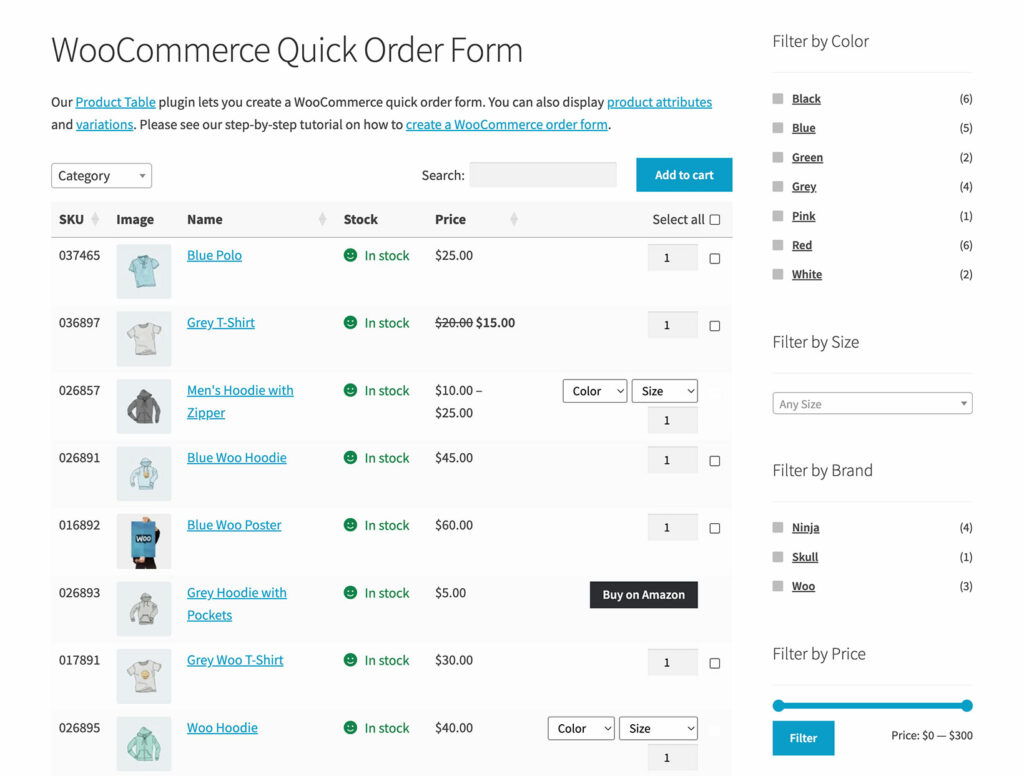
Unlimited products display with AJAX lazy loading means you can create tables with thousands of SKUs without performance issues. The plugin loads products incrementally as customers scroll or paginate, keeping page load times fast regardless of catalog size.
Seven design templates (default, minimal, dark, neutral, rounded, delicate, nature) provide starting points that match different brand aesthetics. You can then customize colors, borders, fonts, spacing, and other design elements to align perfectly with your theme.
Shop page support means that you can automatically enable the WooCommerce product table view on your main store pages, replacing the default layout. Alternatively, insert your pre-built tables onto a normal page and run it alongside your existing shop pages. For example, this can be useful if you’re creating a quick order form page for internal use, or a separate wholesale store.
Full variation support gives you three display options. Either:
- Show variations as dropdowns within each product row for compact display.
- List each variation on separate rows with individual pricing and stock levels for complete visibility.
- Or display a “Select options” button that directs customers to the product page.
Advanced filters help customers to find products in the table more quickly. The WooCommerce Product Table plugin has its own filter dropdowns which appear above the table, and works with WooCommerce’s native filter widgets. For even more advanced filters, it works seamlessly with Barn2’s WooCommerce Product Filters plugin, providing clickable image swatches, price sliders, tag clouds, and interactive filtering options. The core plugin includes standard filter dropdowns, search box, and sortable columns, but the advanced filters add professional polish.
Custom fields, attributes, and taxonomies all display as columns. In fact, you can display absolutely any type of WooCommerce product data as columns. If you use custom fields to store technical specifications, warranty information, or any other data, the plugin pulls that information directly and displays it in your tables. No manual data entry is required.
Multi-select functionality displays checkboxes next to each product, an “Add selected to cart” button, and even a “Select all” option. This significantly speeds up the process for purchasing multiple products at once, boosting average order value.
The total price feature displays subtotals for each row based on selected quantities and variations. This helps customers understand their order value before adding items to cart, reducing surprises at checkout.
Integration excellence really distinguishes this plugin. Barn2 has tested WooCommerce Product Table with 50+ third-party plugins including WooCommerce Product Options, Quick View, Discount Manager, Wholesale Pro, WooCommerce Subscriptions, and many others. The comprehensive compatibility testing means you can confidently use it alongside your existing tools.
WooCommerce Product Table Pricing
Annual licenses start at $99 for a single site, with discounts available for multiple sites. Lifetime licenses are available for merchants who prefer one-time payments. Barn2 offers a 30-day money-back guarantee, so you can test the plugin risk-free.
Best For
Any store type. Wholesale and B2B stores benefit from bulk ordering features. Restaurants use it for online menus. Technical product sellers rely on it for specification display. Digital product stores appreciate the compact format. The plugin’s flexibility adapts to virtually any use case.
WC Product Table PRO
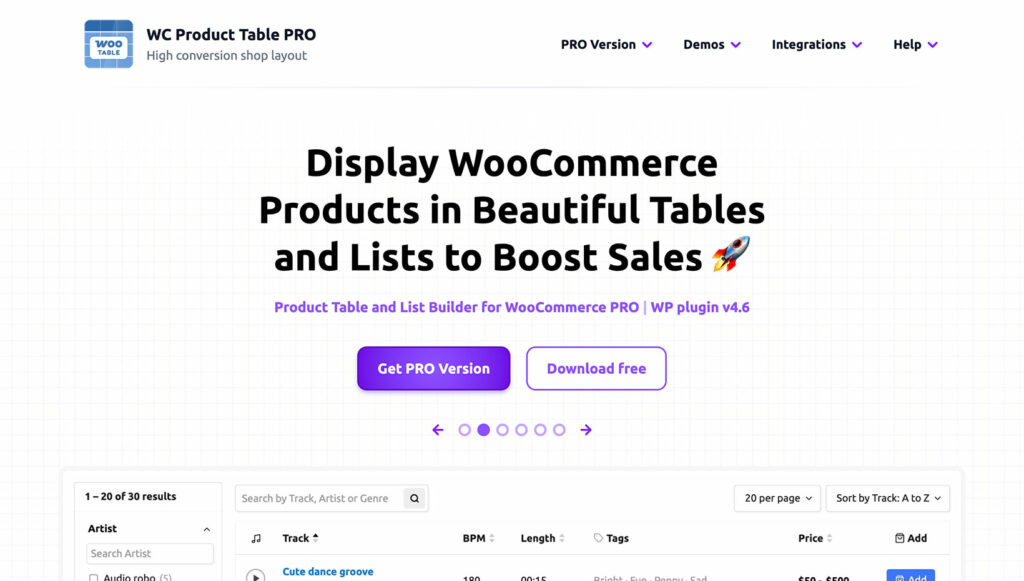
WC Product Table PRO takes a different approach with its modular layout builder. Instead of simply choosing columns, you build table layouts using nested rows and columns, creating more sophisticated designs than standard table structures allow.
Key Features
- The drag-and-drop visual editor lets you construct complex layouts by combining elements. Want to display the product image and name in one column, with price and stock in a nested structure below? The modular system makes this possible. Traditional table plugins limit you to simple column arrangements, but WC Product Table PRO offers grid-like flexibility.
- Fifty-plus product property elements cover every conceivable data point. Display basic information like SKU, price, and stock. Add attributes, custom fields, dimensions, brand, category, and download links. The comprehensive element library ensures you can surface any data stored in your WooCommerce products.
- The customization options let you experiment with designs and see results immediately. Change colors, adjust column widths, modify fonts, and watch the preview update in real-time. This visual feedback loop makes customization faster and more intuitive than editing code or toggling settings blind.
- 30+ pre-built templates provide starting points for common use cases. Load a wholesale template, restaurant menu layout, or spare parts catalog, then customize to your needs. The templates demonstrate the plugin’s capabilities while speeding up implementation.
- List view option adds versatility beyond standard tables. Some products display better in list format with larger images and more description space. The plugin lets you switch between table and list layouts or provide customers with a view switcher to choose their preference.
Pricing
The plugin uses tiered pricing based on site count. Single site licenses cost less than multi-site options, with significant discounts for agencies managing multiple client stores.
Best For
Stores selling spare parts, wholesale operations, catering businesses, and any products requiring focus on detailed specifications. The modular layout builder shines when you need custom arrangements beyond standard table columns.
Limitation: The complex modular editor creates a steeper learning curve. Users who just want a simple table with straightforward columns may find the interface overwhelming. The power comes with complexity, making it potentially overkill for simpler use cases. Some users report that achieving basic layouts takes longer than with simpler plugins due to the modular system.
Overall assessment: WC Product Table PRO excels when you need advanced layout control and have time to learn the system. It’s powerful and flexible, but that power adds complexity. Consider it if you need specific layout capabilities that other product table plugins don’t offer.
Woo Product Table (by CodeAstrology)
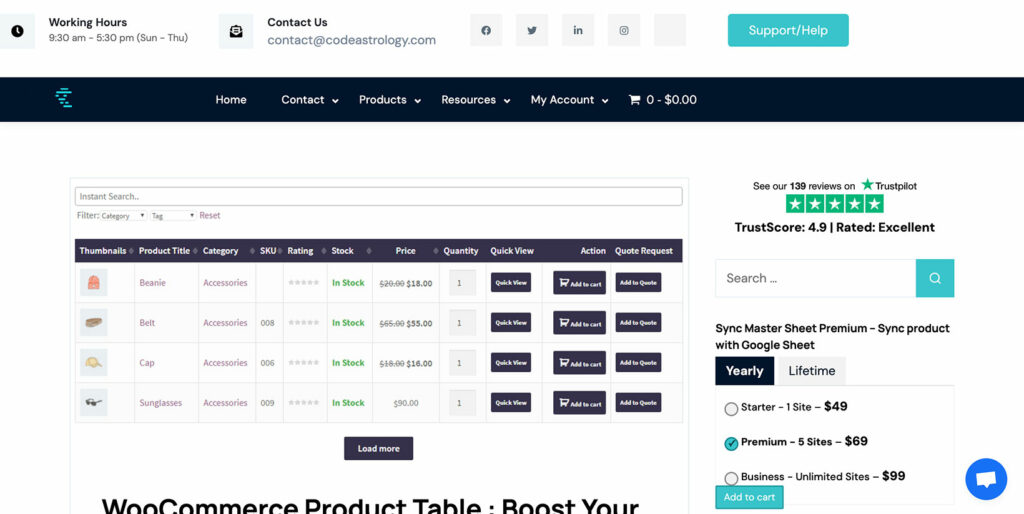
Woo Product Table by CodeAstrology provides a popular free option with premium upgrades. It’s a solid choice for stores on tight budgets or those wanting to test product table functionality before committing to premium solutions.
Key Features
- 31 predefined columns cover standard product data including price, SKU, stock, categories, tags, attributes, and more. The free version includes enough columns for basic tables, though premium versions unlock advanced options.
- 16+ pre-made templates let you quickly create tables without configuring every setting manually. Choose a template that roughly matches your needs, customize a few options, and publish. For stores new to product tables, templates provide valuable starting points.
- Archive page override capability replaces your standard shop and category pages with product tables. Instead of manually adding tables to specific pages, you can make them your default product display method sitewide or for selected categories.
- User conditional visibility lets you show different columns to guest users versus logged-in customers. Hide wholesale pricing from retail customers, display special products only to specific user roles, or customize the table experience based on who’s viewing.
- Attributes in separate columns work well for technical products with multiple specifications. Display color, size, material, voltage, and other attributes as individual columns for easy comparison across products.
- Quick order table mode streamlines bulk ordering by automatically adding products to cart when quantities are adjusted. Customers don’t need to click “Add to cart” buttons – just changing the quantity triggers the addition. This feature suits wholesale buyers who know exactly what they need.
Pricing
The free version provides basic functionality suitable for simple tables. Premium pricing adds advanced features, though exact costs vary. The free version lets you test before buying, reducing risk.
Best For
Budget-conscious stores, testing product tables before premium commitment, simple use cases that don’t require extensive customization.
Limitation: The free version feels limited compared to premium alternatives. Some advanced features that should be standard require premium upgrade. The interface can feel clunky, and customization options lack the polish of enterprise plugins. While adequate for basic needs, it doesn’t match the refinement or feature depth of WooCommerce Product Table by Barn2.
Overall assessment: Woo Product Table serves as a good starting point if you’re unsure about product tables or working with limited budget. It proves the concept and delivers basic functionality. However, most stores eventually outgrow it and upgrade to more capable solutions. Consider it a stepping stone rather than a permanent solution.
Product Tables for WooCommerce (by Codup)

Product Tables for WooCommerce by Codup focuses specifically on B2B use cases, with tight integration to Codup’s B2B eCommerce plugin. If you’re already using that B2B solution, this product table plugin makes a logical companion.
Key Features
- The native B2B eCommerce plugin integration provides request for quote functionality, price gating, and role-based pricing display. The plugins work seamlessly together, sharing settings and user roles without configuration conflicts.
- RFQ (Request for Quote) button support lets wholesale buyers add products to quote requests instead of immediately purchasing. This matters for B2B transactions where custom pricing negotiations are standard. Customers select products in the table, then request quotes rather than checking out.
- Category and price filtering helps customers narrow large catalogs. Filter by product categories to view specific types. Set minimum and maximum price thresholds to find products within budget. The filters work via AJAX without page reloads, keeping the experience smooth.
- Variable product support displays variations and lets customers select options directly from the table. Choose size, color, or other attributes without visiting product pages.
Pricing
Available through the WooCommerce Marketplace with standard licensing options.
Best For
B2B stores already using Codup’s B2B eCommerce plugin. The tight integration between plugins provides value that standalone product table plugins can’t match for this specific use case.
Limitation: The plugin’s best features require the companion B2B plugin, limiting value as a standalone solution. Stores not using Codup’s B2B ecosystem will find better options elsewhere. Features feel basic compared to WooCommerce Product Table by Barn2, with less flexibility and fewer customization options. Good for a specific niche, but not the best general-purpose solution.
Overall assessment: Product Tables for WooCommerce serves B2B stores in the Codup ecosystem well, but lacks versatility. If you’re committed to Codup’s plugins, this makes sense. Otherwise, more comprehensive options provide better value.
Other Notable Mentions
Several other WooCommerce product table plugins deserve brief mention:
JetProductTables (Crocoblock) works well for Elementor users and provides strong page builder integration. It’s part of the Crocoblock ecosystem, requiring a subscription that includes multiple plugins. The limitation is being locked into that ecosystem. If you already use Crocoblock, JetProductTables integrates smoothly. For others, it’s an expensive entry point just for product tables.
Product Table Ultimate offers a solid mid-tier option with good features and reasonable pricing. It includes necessary functionality for most use cases without overwhelming complexity. The limitation is fewer integrations than Barn2’s solution and less comprehensive documentation. It’s adequate but doesn’t excel in any particular area.
Ninja Tables WooCommerce represents a general table plugin adapted for WooCommerce rather than a purpose-built product table solution. It handles WooCommerce products as one data source among many. While functional, it feels like an adapted solution rather than a dedicated tool. Purpose-built WooCommerce product table plugins offer better optimization for selling online such as variations, stock management, and cart integration.
Top Use Cases for WooCommerce Product Tables
As we saw earlier, product tables excel when data matters more than their visual presentation. To bring that to life a bit further, here are some scenarios where they deliver maximum value.
Wholesale & B2B Order Forms
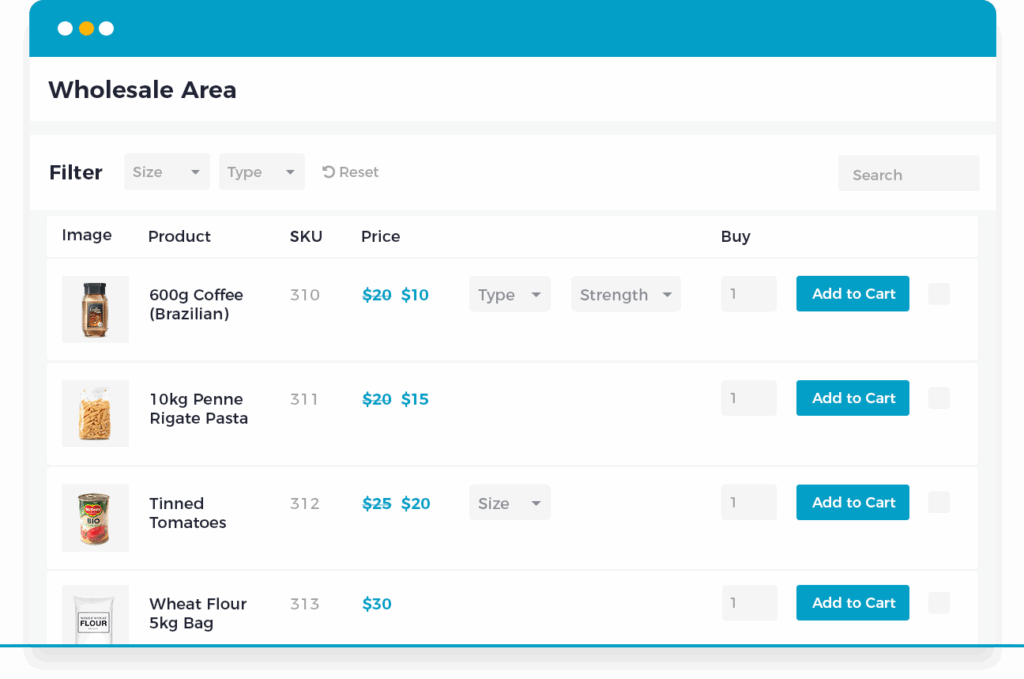
Wholesale buyers order in bulk, know products by SKU, and want fast ordering. Product tables display all relevant information in scannable format – SKU, product name, unit price, case price, quantity breaks, and stock availability. Buyers scan, adjust quantities, use multi-select checkboxes, and add everything at once.
Efficiency gains are dramatic: customers who previously spent 30-60 minutes now complete orders in 5-10 minutes. Learn about managing custom field data for wholesale pricing.
Technical & Electrical Products
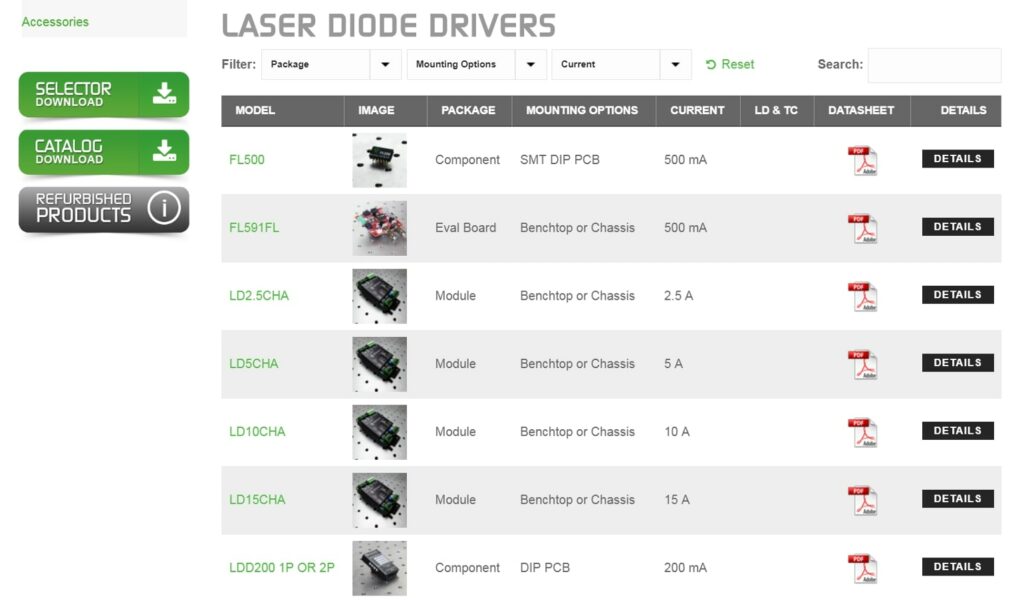
Technical products sell on specifications. Customers need voltage ratings, amperage, connector types, wire gauge, and compatibility before purchasing.
WooCommerce product table plugins make specifications comparable by displaying technical attributes as columns. Filter by voltage rating, search for part numbers, and compare products without reading individual descriptions. Stock visibility matters particularly when alternatives aren’t interchangeable.
Restaurant Menus & Food Ordering
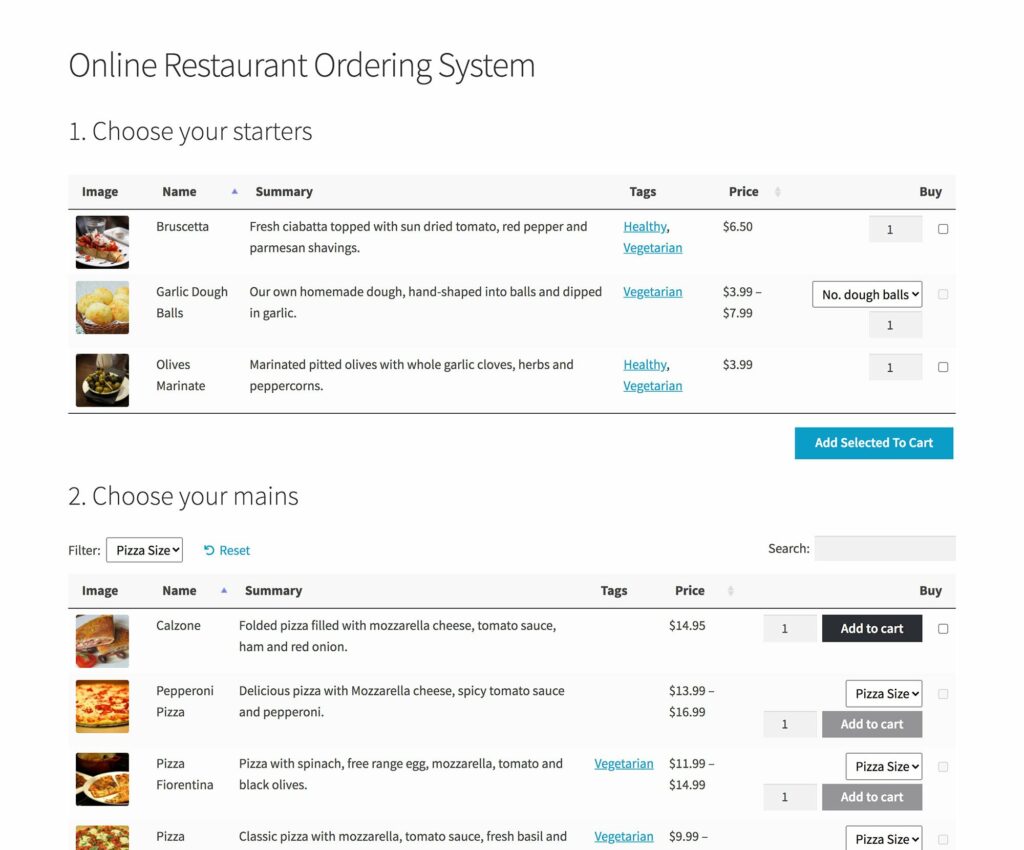
Online restaurants benefit from table layouts where customers view all menu items simultaneously. Display names, descriptions, prices, and dietary information. The variation support handles dish sizes and customizations. Customers check multiple items, adjust quantities, and add their entire order with one click – matching how people actually order food.
Spare Parts & Auto Supplies
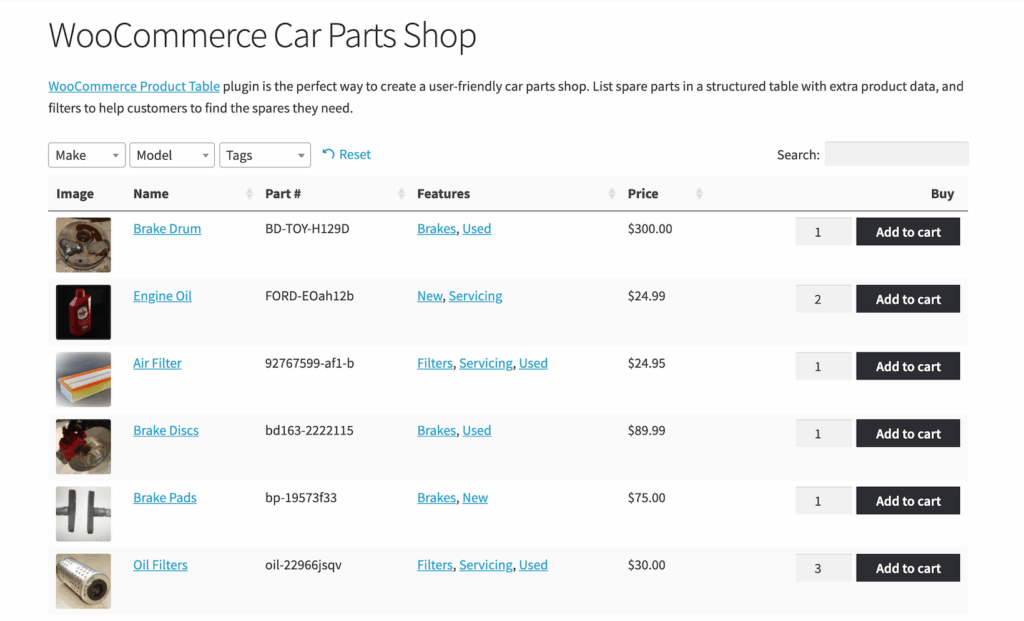
Auto parts and equipment components sell to customers who know exact part numbers. Part number search becomes the primary navigation – type an SKU and filter immediately. You can display compatibility information (vehicle makes, models, years) as filterable attributes. Show dimensions, materials and OEM compatibility to help customers verify they’re ordering correctly.
Digital Downloads
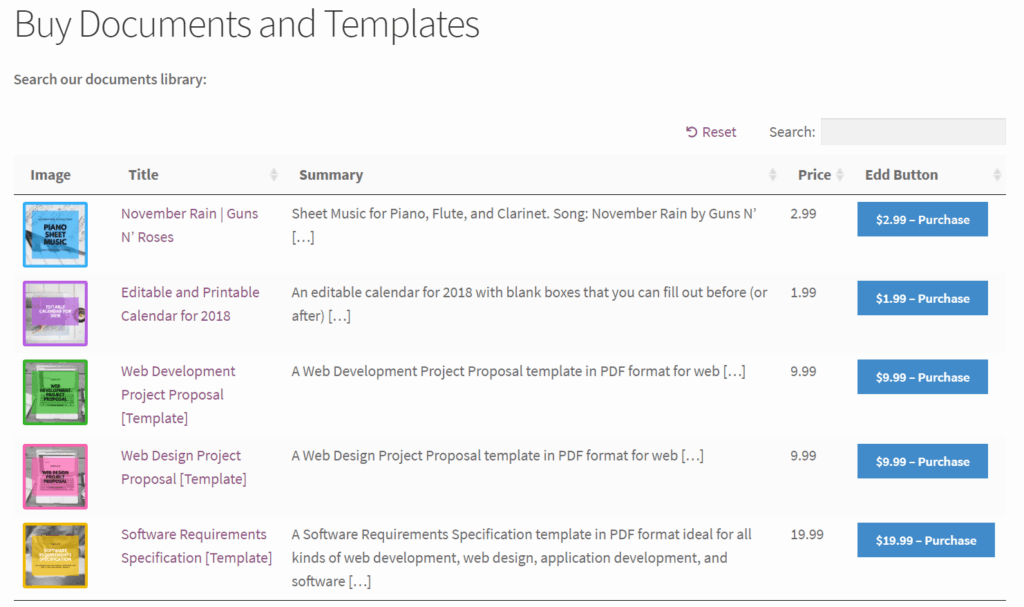
Digital products (audio, software, e-books, etc.) rarely benefit from large images. Product tables provide ideal layouts for listing hundreds of items with essential information such as title, author, duration, file format, and price. You can even add audio players, PDF previews, or sample links within the table. The multi-select supports bulk purchasing for customers buying multiple items.
Medical, Pharmaceutical and Beauty Supplies
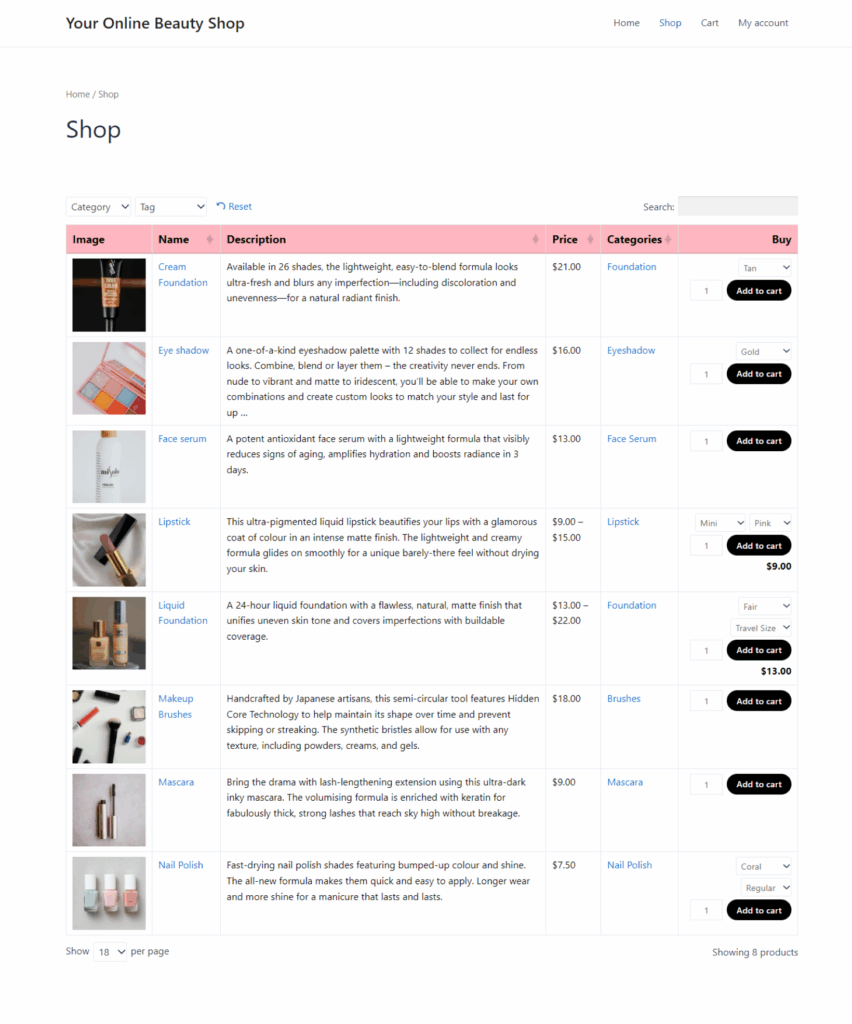
Medical supply stores serve professional customers who need specific products quickly, while beauty stores serve the general public. Either way, you can display regulatory information (e.g. FDA approval or prescription requirements), precise specifications (measurements, volumes, concentrations, etc.), and batch tracking.
How to Choose the Right Product Table Plugin
Select the ideal WooCommerce product table plugin for your store based on your requirements, budget, and technical needs. Here are some factors to bear in mind:
Budget considerations: Free plugins (e.g. Woo Product Table) work for simple needs. Premium options starting around $99 annually (e.g. WooCommerce Product Table by Barn2) provide comprehensive features. Consider the total cost beyond license fees – poor documentation requires more development time, while comprehensive support reduces implementation costs. Remember that product tables are designed to increase your sales, which should more than cover the cost of the plugin.
Support matters: Less technical users need responsive support teams. Check reviews, verify support channels, and confirm response times. Consider testing the company’s pre-sales support quality before purchasing.
Keeping Your Product Table Data Up to Date
Product tables showcase your data effectively, but they’re only as good as the information they display. When tables expose hundreds or thousands of products simultaneously, maintaining accurate prices, stock levels, and specifications becomes critical.
The challenge intensifies with scale. Updating prices for 50 products manually is tedious but manageable. Updating 500 products is overwhelming. Managing 5,000 products across multiple categories with variations becomes impossible through individual product editing.
This matters more for stores using product tables because errors become immediately visible. In grid layouts, customers might not notice one product with incorrect pricing among dozens on a page. In tables showing 100 products with prices in adjacent columns, pricing inconsistencies stand out.
Spreadsheet-style bulk editing complements product table display perfectly. Just as product tables display data in scannable rows and columns, spreadsheet editors let you manage that data using familiar Excel-like interfaces.
Setary provides this capability by connecting directly to your WooCommerce store and presenting all product data in an editable spreadsheet. See products and variations in rows, with columns for every field (price, stock, SKU, attributes, custom fields, categories, descriptions). Edit any cell directly, apply bulk actions to selected products, filter to specific product sets, and save changes back to WooCommerce instantly.
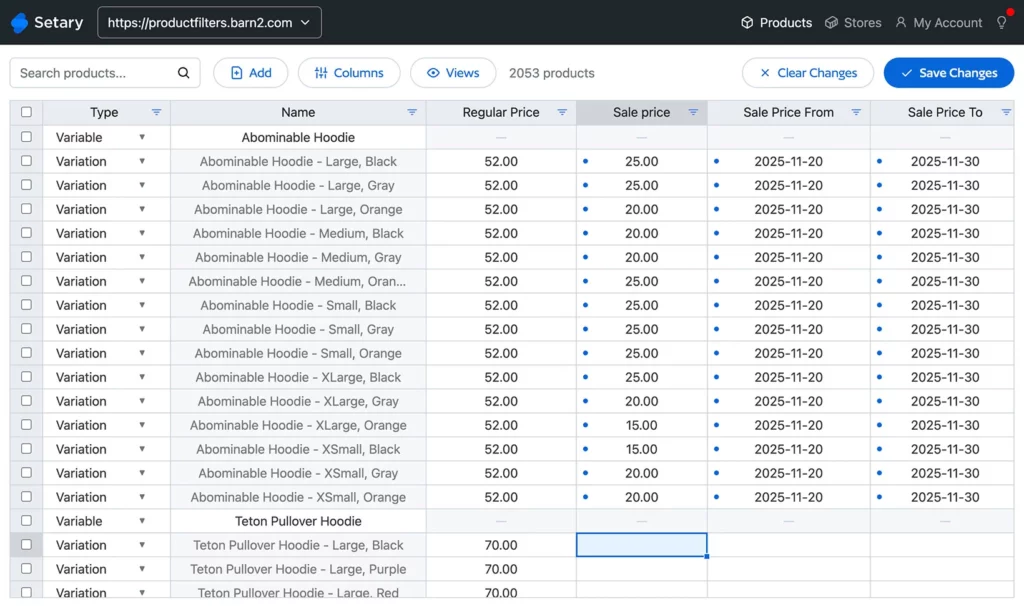
This becomes particularly valuable for stores using product tables because:
Bulk price updates happen across categories in seconds. Need to increase all prices by 10% for a category? Select those products, apply a percentage increase via bulk action, and publish. Seasonal pricing adjustments, supplier cost changes, and promotional discounts that would take hours manually complete in minutes. Bulk update prices efficiently rather than dreading the manual work.
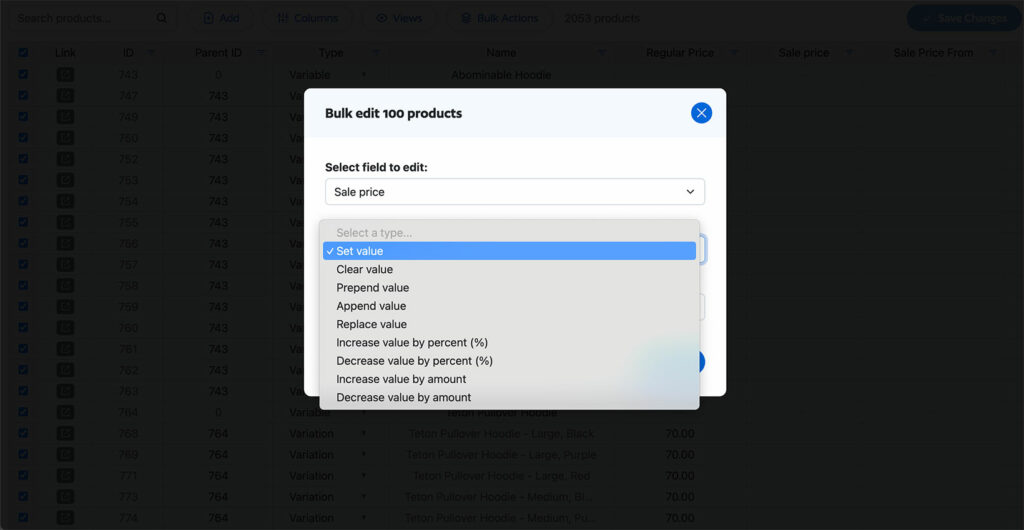
Custom field management stays efficient even with complex data. If your product tables display technical specifications stored in custom fields, editing those fields individually becomes prohibitively slow. Spreadsheet interfaces let you see all custom fields as columns, edit multiple products simultaneously, and use fill-down for common values.
Variation editing transforms from a nightmare into a manageable task. Product variations typically require editing one at a time through WooCommerce’s native interface. Spreadsheet editors display all variations as separate rows, letting you adjust prices, stock levels, and attributes across dozens of variations at once. Bulk edit WooCommerce variations with the same ease as simple products.
Multi-store synchronization matters if you run multiple WooCommerce stores or a multisite installation. Keep product data synchronized across stores, update inventory for multiple locations, or push price changes to all sites simultaneously. This capability prevents the chaos of managing separate databases manually.
The connection to product tables is clear: you’re already displaying data in table format on the frontend, so managing that data in table format on the backend makes perfect sense. The same mental model applies to both viewing and editing.
Best Practices for Product Tables
Before we finish, let’s look at some best practices to ensure your tables deliver optimal results. These focus on implementing product tables in WooCommerce with attention to user experience, performance, and design.
Design & UX
Keep essential columns visible. Show only the 5-7 fields customers need for purchase decisions. Hide less critical information or make it expandable. Test with real users when possible.
Use clear column headers. Be specific: “Unit Price” not just “Price.” Match your audience’s language – B2B buyers understand jargon, retail customers might not.
Implement smart defaults. Sort products in the most useful way initially (by SKU for reorders, by category for restaurants, by popularity for retail). Provide sorting options but make the default view immediately useful.
Design mobile-first. Decide which columns are essential on small screens. Use the plugin’s responsive options to hide columns on smaller devices.
Performance
Enable AJAX lazy loading for 100+ products. Display 25-50 products per page initially, loading more as customers scroll or paginate.
Optimize image sizes. Use 50-100px thumbnails. Generate appropriate sizes rather than scaling large images with CSS. Implement lazy loading for images.
Use caching appropriately. Enable the built-in caching for product tables showing same products to all users. Disable it for role-based pricing or user-specific content.
Monitor actual performance. Use PageSpeed Insights to measure load times. If exceeding 3 seconds, tweak the plugin settings to speed up your product tables.
Conclusion
WooCommerce product tables transform shopping for stores where data matters more than visual presentation. By displaying products in searchable, sortable, filterable tables, you eliminate friction between browsing and buying.
WooCommerce Product Table by Barn2 consistently delivers the best results for most businesses. With 50+ features, comprehensive documentation, extensive compatibility, and proven success across thousands of stores, it represents the safest investment.
Pair your frontend table display with efficient backend management such as Setary to keep your product data accurate at scale. This combination creates competitive advantages that grow more valuable as your catalog expands.
Bulk edit anything in WordPress, WooCommerce and Shopify
Try our demo now and discover how you could save thousands of hours managing your site.
or try the demo