
When people start selling custom products online, they often hit a wall. Imagine that you want to sell a t-shirt which allows customers to upload a photo to be printed on it, and then select gift wrapping. WooCommerce’s default setup makes this surprisingly complicated. You have to create countless product variations or handle custom requests through customer notes, emails, and phone calls.
That’s when I discovered WooCommerce product add-ons plugins.
Product add-ons let customers personalize products directly on the product page. They can add custom text, upload files, select gift wrapping, choose delivery dates, or pick from dozens of options. Each selection updates the price in real-time.
The business benefits are substantial. Product add-ons increase average order value naturally, reduce returns when customers get exactly what they want, and simplify your product catalog by eliminating endless variations.
But dozens of WooCommerce product options plugins exist, each claiming to be the best. Some are excellent. Others slow down your site or lack essential features. I’ve tested the top plugins to find which ones actually deliver.
In this guide, I’ll walk you through the best WooCommerce product add-ons plugins available today. You’ll learn what makes WooCommerce Product Options by Barn2 the top choice, which alternatives are worth considering, and how to choose the right plugin for your needs.
What Are WooCommerce Product Add-Ons?
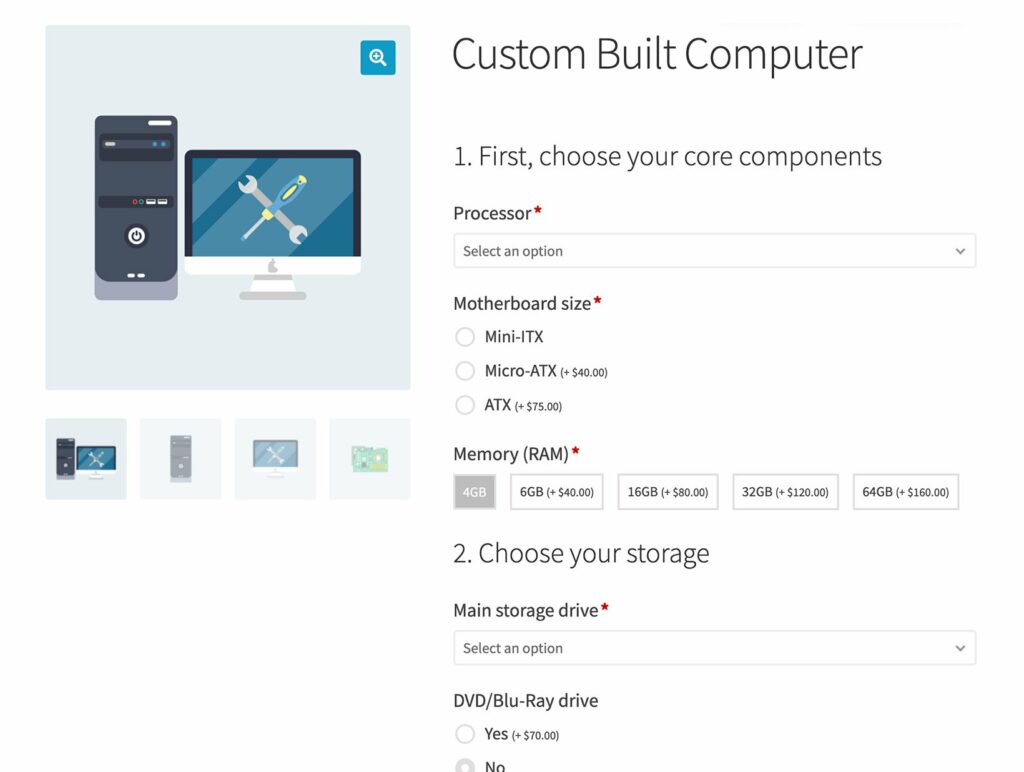
WooCommerce product add-ons are extra customization fields you add to product pages that allow customers to personalize their purchases. These fields can include text inputs, checkboxes, radio buttons, file uploads, date selectors, and many other options.
Unlike product variations (which offer predefined choices like size or color), product add-ons give customers freedom to provide their own information or select optional extras. They’re perfect for personalization, optional services, and custom specifications that would be impractical to set up as variations.
How Product Add-Ons Differ from Variations
The distinction between WooCommerce product add-ons and variations matters for your store setup. Variations require you to create every possible combination in advance. If you sell a shirt in 5 sizes, 8 colors, and 3 fabric types, you’re managing 120 separate variations. Each one needs its own SKU, price, and inventory tracking.
Product add-ons calculate pricing dynamically. That same shirt could have size and color as variations, with fabric upgrade, custom text, and gift wrapping as add-ons. You’re managing 40 variations instead of hundreds, and customers can still get exactly what they want.
Product add-ons are also useful for any type of option that are best displayed in a style that isn’t a dropdown list. That’s because product variations can only appear as dropdowns. A product add-ons plugin adds much more flexible ways to display options than you get with variation dropdowns.
I find that variations work best for attributes that change the core product and need individual inventory tracking. Add-ons excel for optional extras, customization, and anything where tracking every combination separately would be overwhelming.
Key Benefits of Using Product Add-Ons

Product add-ons solve real problems that cost stores money every day. When customers can’t customize products the way they want, they either abandon their carts or contact support to request special arrangements. Both scenarios waste time and lose sales.
Higher average order value comes naturally with product add-ons. Customers see relevant extras right where they’re making purchase decisions. A customer buying a necklace can add engraving, premium packaging, and a greeting card without navigating away from the product page. These small additions compound across hundreds of orders.
Fewer returns happen when customers get exactly what they ordered. If someone can specify their measurements, upload their design, or select their preferred configuration upfront, there’s no surprise when the product arrives. This particularly matters for customized items where returns might not even be possible.
Simplified inventory management saves hours of work. Instead of tracking stock for every combination of options, you manage fewer core products and let the add-ons layer on top. Your product catalog stays manageable even as you offer more choices to customers.
Better customer experience reduces support tickets. Clear product options eliminate confusion about what’s included or how much something costs. Customers make informed decisions without needing to email you for clarification.
Best WooCommerce Product Add-Ons Plugins
After testing the major plugins available, I can tell you that not all WooCommerce product options plugins are created equal. Some offer impressive feature sets but drag down your site speed. Others are lightweight but lack critical functionality. A few strike the right balance.
Let me walk you through the best options, starting with my top recommendation.
WooCommerce Product Options by Barn2
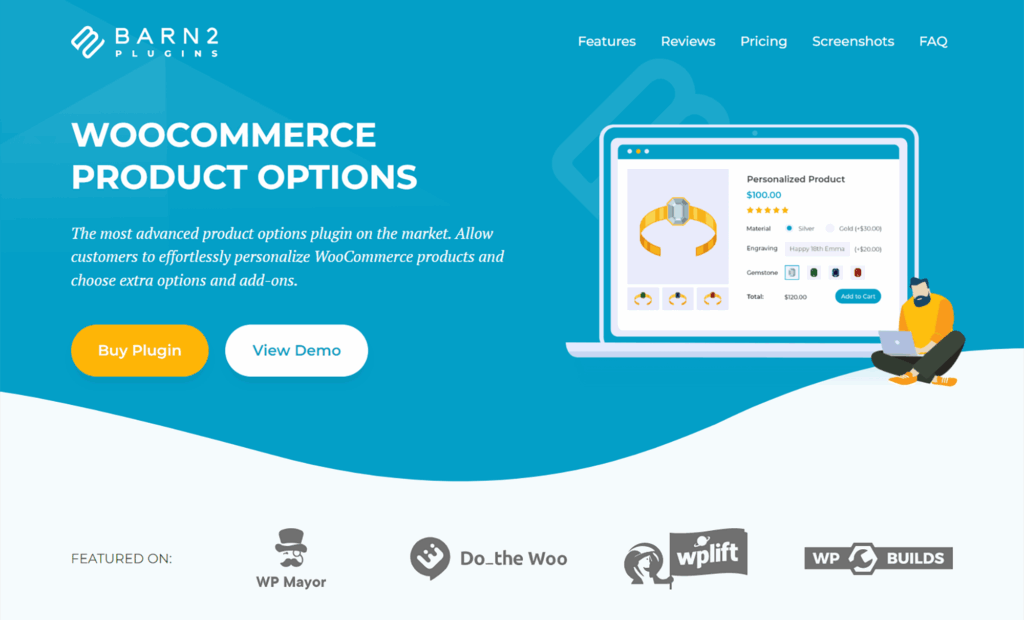
WooCommerce Product Options by Barn2 is the most comprehensive product add-ons plugin on the market. I tested it extensively against competitors, and it consistently delivers the best combination of features, performance, and usability.
The plugin gives you everything you need to create sophisticated product customization. You get 16 field types, 8 pricing options including advanced price formulas, powerful conditional logic, and the ability to display existing variations as add-ons. It’s the only plugin I’ve found that truly handles complex use cases without compromising on speed.
Complete Feature Breakdown
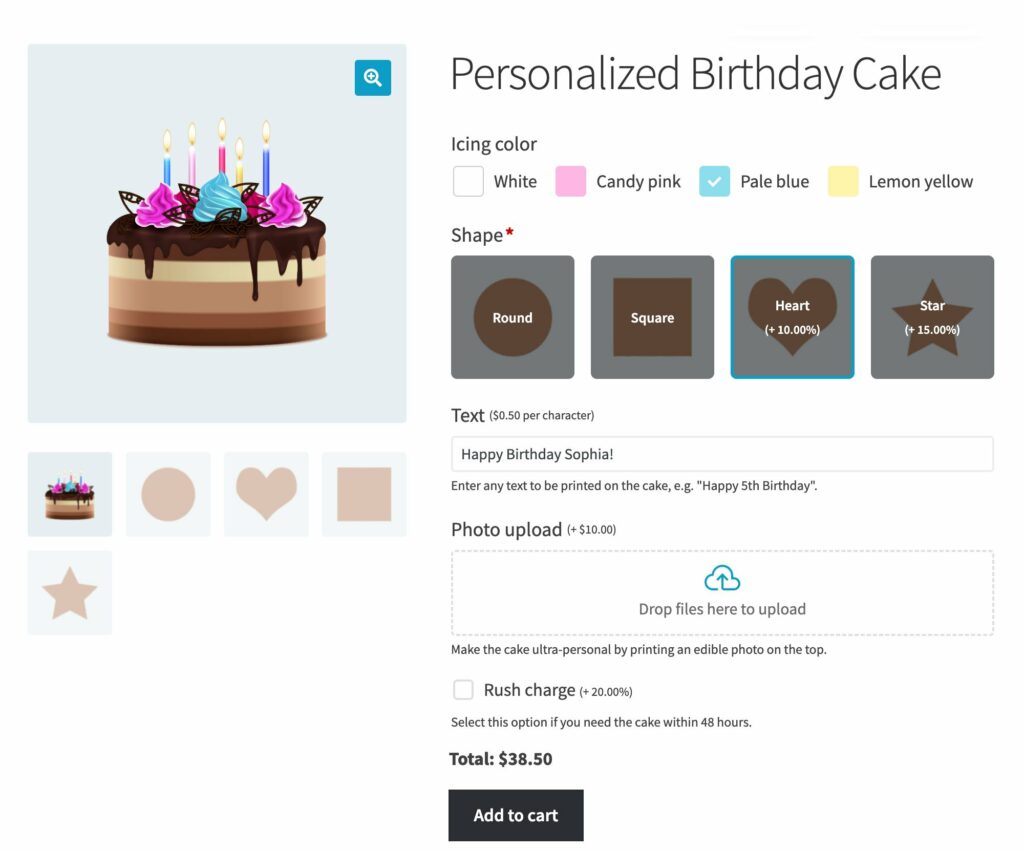
Field types cover virtually any customization scenario:
- Text fields and text areas for custom information like names or special instructions
- Checkboxes and radio buttons for selecting from predefined options
- Dropdown menus for longer lists of choices
- Number fields for quantities, measurements, or numeric data
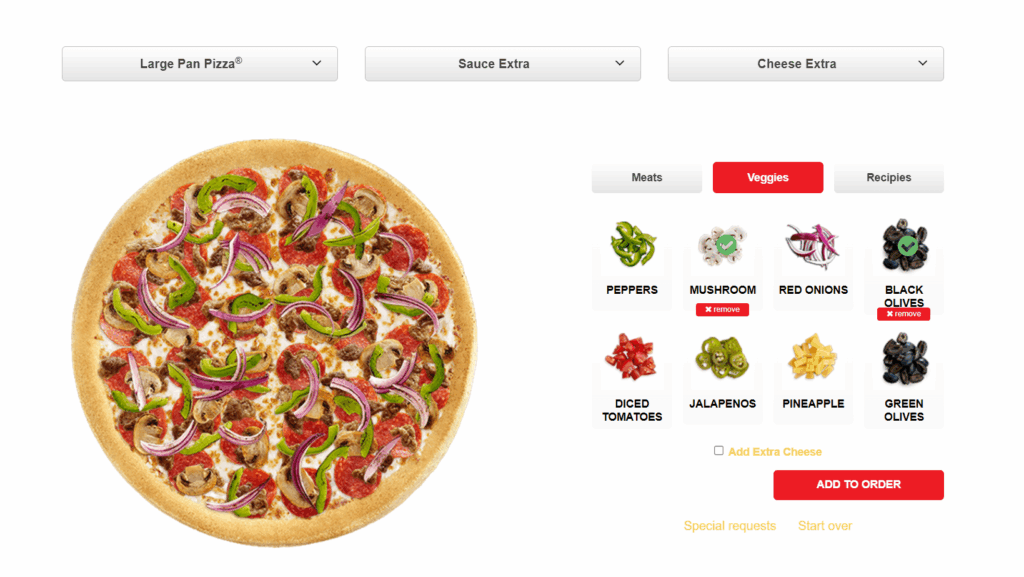
- Image buttons that display clickable images for visual product selection (perfect for pizza toppings or furniture fabrics)
- Color swatches for elegant color selection
- File upload fields with controls for file size and allowed types
- Date and time pickers for bookings, delivery scheduling, or event-based products
- Customer-defined pricing fields for “name your price” functionality (donations or flexible pricing)
- Products add-on type that displays other products from your store as add-on selections, turning accessories into upsell opportunities
Eight pricing options handle complex scenarios:
- Flat fees that add a fixed amount (once or multiplied by quantity)
- Percentage increases and decreases that adjust price proportionally
- Character count pricing that charges based on text length (ideal for engraving or printing)
- File count pricing based on uploaded file quantity
- Price formula field that transforms the plugin into a full measurement price calculator complete with mathematical operators, logical functions, and custom variables
Conditional Logic That Keeps Forms Clean
Smart conditional logic prevents customers from facing overwhelming option lists. You can show or hide fields based on what customers select in other fields or which variation they choose.
A phone case store might hide the “Custom Text” field until customers check “Add Personalization.” A furniture store could show fabric options only when customers select the upholstered version. A print shop might display rush shipping options only for orders under a certain quantity.
Conditional logic keeps product pages clean and focused. Customers see only relevant options for their selections, reducing confusion and abandoned carts. I’ve found this particularly valuable for complex WooCommerce products where displaying all add-ons at once would be overwhelming.
Display Variations as Add-Ons
Here’s a feature that solves a common frustration and is unique to WooCommerce Product Options compared to other product add-ons plugins. WooCommerce’s default variation dropdowns aren’t particularly engaging. Customers can’t see visual representations, and the user experience feels dated.
WooCommerce Product Options lets you keep using WooCommerce’s variation system for inventory management and SKUs, but display those variations as checkboxes, radio buttons, image buttons, or color swatches. You get the backend benefits of variations with a much better frontend experience.
This works because you can select existing variation attributes in the plugin’s interface and choose how to display them. All the variation data (price, stock, images) comes through automatically. You’re not duplicating work or managing data in two places.
Products as Options for Strategic Upselling
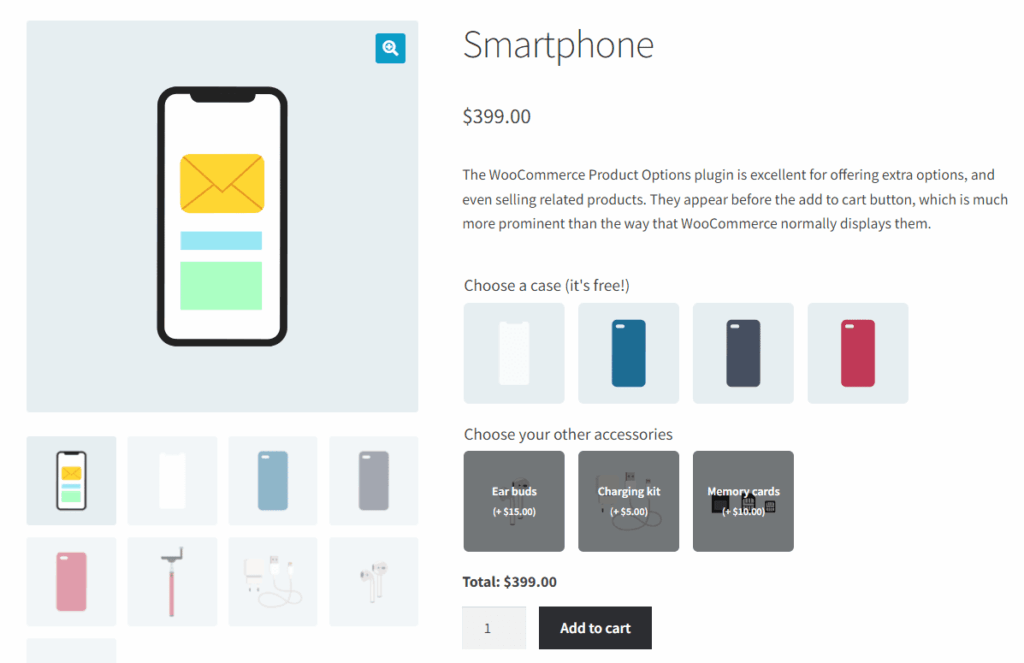
The products option type deserves special attention. Instead of manually creating add-on fields for accessories, you select actual products from your store to display as options.
Imagine selling laptops. You could add the products option type and select from your accessories category. Popular items like laptop bags, mice, and screen protectors appear as checkboxes or image buttons right on the laptop product page.
This approach can significantly increase average order value. That’s because customers see relevant accessories at the exact moment they’re most likely to buy.
Pricing Structure
WooCommerce Product Options uses both annual and lifetime licensing options. Single site licenses start at a reasonable price point for annual renewals, with multi-site and unlimited site options available. Lifetime licenses cost more upfront but eliminate recurring fees and include lifetime support and updates.
The plugin includes a 30-day money-back guarantee, which I always appreciate. It gives you time to thoroughly test with your actual products before committing.
Why This is My Top Recommendation
After using multiple WooCommerce product add-ons plugins, I keep coming back to this one for client projects. WooCommerce Product Options handles simple scenarios elegantly and scales up to complex requirements without breaking a sweat.
The price formula feature alone sets it apart from competitors. The conditional logic actually works reliably. The performance stays solid even with numerous options. And the support team responds quickly when you need help.
WooCommerce Product Options also works with a wide range of other plugins. For example, you can use it with Barn2’s Product Table plugin to let customers select product add-ons directly on the shop page. Read our review of the best product table plugins for more information.
WooCommerce Product Add-Ons (Official Extension)
The official WooCommerce Product Add-Ons extension comes directly from WooCommerce. Being the official solution means guaranteed compatibility with WooCommerce updates and seamless integration with most themes and plugins.
The plugin covers basic product add-ons functionality competently. You can add text fields, text areas, checkboxes, radio buttons, dropdown menus, and file uploads. Each option can have flat fees, quantity-based fees, or percentage-based pricing. You can create global add-on groups or add options to individual products.
The interface is familiar if you’re accustomed to WooCommerce’s admin panels. Options appear in a straightforward format that matches WooCommerce’s design language. For stores with simple customization needs, this simplicity can be an advantage.
Where It Falls Short
However, the official WooCommerce Product Add-Ons plugin lacks features that modern stores often need. There’s no price formula functionality, so custom calculations aren’t possible. You can’t create measurement price calculators or complex pricing models. This limits use cases significantly compared to more advanced plugins.
The field type selection is basic. You get the essentials, but there are no color swatches, date pickers, customer-defined pricing, or image button options. Conditional logic exists but in a limited form compared to specialized plugins.
What concerns me more is the update frequency. The official plugin receives updates less frequently than third-party alternatives. While it stays compatible with core WooCommerce, almost no new features are added. The development pace suggests this isn’t a priority product for Automattic.
The pricing also seems high for what you receive. Given the feature limitations and slow development, competing plugins offer substantially more value at similar or lower price points.
Best Use Case
This plugin makes sense primarily if you’re deeply invested in the official WooCommerce ecosystem and prefer the security of knowing your plugins come from the same source as WooCommerce itself. It works well for straightforward product options without complex pricing needs.
Stores wanting simple gift message fields, basic customization options, or uncomplicated upsells can get by with this plugin. Just know that you’re trading features and flexibility for the official stamp.
Extra Product Options for WooCommerce by ThemeHigh
ThemeHigh’s Extra Product Options for WooCommerce plugin offers an impressive 19 field types and extensive display customization options. The plugin positions itself as a flexible solution for stores needing visual control over how options appear.
You get the standard field types plus some nice additions like color pickers and date pickers. The plugin provides three different display positions for your add-on fields, which helps with theme compatibility when the default position doesn’t work well with your design.
Conditional logic and display rules let you control when fields appear based on various criteria including product categories, user roles, and other field selections. This granularity can be valuable for complex product catalogs where different products need different options.
The bulk assignment of options to product categories saves time if you’re adding the same fields to multiple products. Rather than editing products individually, you set up the options once and assign them to a category.
Performance Concerns
The main drawback I’ve encountered with this plugin is a performance quirk that becomes more pronounced as your configuration grows. The plugin stores all options in WordPress’s WP Options table as a single record. This design choice causes problems with larger setups.
When a product page loads, the plugin must parse all your configured options to find the ones relevant to that product. With a handful of option groups, this happens quickly enough. But as you add more products and more complex option configurations, the parsing time increases.
I’ve noticed this especially on stores with 50+ products using various option combinations. Page load times become noticeably longer, and you’re more likely to encounter timeout issues during option editing. For small to medium catalogs, this won’t matter much. For larger stores, it becomes a concern.
Technical Knowledge Requirements
Setting up advanced features in this plugin requires more technical comfort than some alternatives. The interface can feel overwhelming initially, with numerous settings and configuration options. While this provides control, it also means a steeper learning curve.
Documentation helps, but I found myself needing to experiment more with this plugin than with simpler alternatives.
Pricing and Best Fit
Extra Product Options offers both free and paid versions, with the Pro version unlocking additional features and field types. The pricing sits in the mid-range compared to alternatives.
This plugin suits stores that need specific visual customization options and don’t mind investing time in setup. It works well when you need features that are included here but missing from simpler plugins. Just plan for the performance implications if you’re running a large catalog.
Product Add-Ons for WooCommerce by Acowebs
Acowebs offers a free product add-ons plugin built around a drag-and-drop form builder interface. For users who think visually and prefer building forms by dragging elements around, this approach feels intuitive.
The plugin includes 10+ custom field types covering the essential options most stores need. Text inputs, checkboxes, radio buttons, dropdowns, date pickers, color pickers, and file uploads all work as expected. You can set flexible pricing options based on selections, quantities, or fixed amounts.
Creating option groups is straightforward with the visual builder. You drag field types onto your canvas, configure their settings, and arrange them in the order you want. This immediate visual feedback helps you understand how forms will look before saving.
The plugin supports both global option groups and product-specific options. Conditional logic lets you show or hide fields based on customer selections. Price calculations update in real-time as customers make choices.
The First Load Problem
Performance testing revealed an issue that affects user experience. On the first page visit, the plugin runs 17 database queries and requires noticeable time to initialize. Subsequent visits are faster because the plugin caches data using WordPress transients, but that first impression matters.
For products that get frequent visits from returning customers, the caching reduces the problem. But if you’re driving new traffic through ads or SEO, many visitors will experience that slower initial load. Given how much page speed affects bounce rates, this concerns me.
The caching strategy also means that changes to add-ons don’t appear immediately for users who’ve visited recently.
Interface Usability
While the drag-and-drop builder is visually appealing, I found the overall interface less intuitive than expected. Some settings hide in places you wouldn’t naturally look for them. The organization of options within the field settings could be clearer.
Once you learn where everything is, the workflow becomes faster. But that learning curve exists, and it’s steeper than plugins with simpler, more straightforward interfaces.
Pricing and Recommendation
Acowebs prices their plugin competitively in the mid-range. They offer both free and premium versions, with the premium version unlocking additional features.
This plugin works best for users who strongly prefer visual form builders and don’t mind the initial page load delay. If your store gets substantial traffic from returning customers who will benefit from the caching, the performance issue matters less. For stores depending primarily on new visitor conversions, the slower first load is more problematic.
YITH WooCommerce Product Add-Ons
YITH creates an extensive ecosystem of WooCommerce plugins, and their product add-ons solution integrates well with other YITH products. If you’re already using multiple YITH plugins, adding their add-ons extension creates a cohesive experience across your WooCommerce backend.
The plugin provides comprehensive customization options with numerous field types and configuration settings. Advanced options let you create complex product configurations with detailed rules for when options appear. The interface follows YITH’s design language, which will feel familiar if you use their other plugins.
Its conditional logic and display rules are robust, letting you control option visibility based on various factors. You can create sophisticated option dependencies where selecting one choice reveals or hides other relevant fields.
Price and Performance Trade-Offs
YITH plugins consistently price higher than many alternatives. While the company justifies this with their support and ecosystem integration, the cost-benefit calculation doesn’t always work out favorably when comparing features to price.
Multiple sources have noted performance concerns with YITH’s product add-ons plugin. The plugin can add significant page weight and increase load times noticeably. For stores where milliseconds of page speed affect conversion rates, this matters significantly.
I measured the page weight and query count against competitors and found YITH consistently toward the heavier end of the spectrum. This doesn’t mean the plugin is broken or unusable. It means you need to carefully consider whether the specific features you need justify the performance impact. You get capabilities, but at a cost to site speed that affects both user experience and search rankings.
Best Use Case
YITH Product Add-Ons makes sense primarily if you’re already invested in YITH’s ecosystem and value the integration between their plugins. The unified interface and guaranteed compatibility with other YITH extensions provides convenience that matters for some workflows.
For stores where a few hundred milliseconds of page load time won’t significantly affect conversion rates, the performance concerns might be acceptable. Just ensure you’re genuinely benefiting from YITH-specific features rather than paying more for capabilities available elsewhere at better performance.
Other Options Worth Brief Mention
Several other WooCommerce product options plugins exist, though most have significant drawbacks.
PPOM for WooCommerce has 20,000+ downloads but performance testing revealed serious concerns. The plugin generated 65 database queries per page load, which is excessive. The backend interface also feels cluttered. You need to have both the free and premium versions installed, cluttering your plugins list and creating potential conflicts (I prefer plugins that consolidate everything into a single installation). While some users report success, the performance issues lead me to recommend alternatives.
Advanced Product Fields by Studio Wombat performs well in testing, but comparison content comes primarily from the developers themselves rather than independent reviewers.
Comparison Table
Here’s how the major WooCommerce product add-ons plugins stack up against each other:
| Plugin | Starting Price | Field Types | Price Formulas | Conditional Logic | Performance | Best For |
|---|---|---|---|---|---|---|
| WooCommerce Product Options (Barn2) | $79/year | 16+ types including image buttons, color swatches, date pickers | Advanced formulas with custom variables | Yes, sophisticated | Excellent (optimized) | Complex customization, measurement calculators, best overall |
| WooCommerce Product Add-Ons (Official) | $49/year | 6 basic types | No | Limited | Good | Simple needs, official ecosystem preference |
| Extra Product Options (ThemeHigh) | Free/$39/year | 19+ types | No | Yes | Degrades with scale | Visual customization, smaller catalogs |
| Product Add-Ons (Acowebs) | Free/$49/year | 10+ types | No | Yes | Slow first load | Drag-and-drop preference, returning customers |
| YITH Product Add-Ons | $199/year | Multiple types | No | Yes | Performance concerns | YITH ecosystem integration |
| PPOM for WooCommerce | Free/$99/year | Extensive | Basic | Yes | Poor (65 queries) | Not recommended |
Note: Prices are approximate and may vary. Check each plugin company’s website for current pricing and licensing options.
How to Choose the Right Plugin for Your Store
Everyone’s needs are different, so you should choose the best WooCommerce product add-ons plugin based on your current needs and future growth plans. I’ll walk you through the key factors that should influence your decision.
Essential Features to Consider
Field type variety determines what kinds of customization you can offer. At minimum, you need text fields, checkboxes, radio buttons, and dropdowns. Beyond these basics, consider whether you need file uploads for customer designs, date pickers for scheduling, color swatches for visual selection, or number fields for measurements.
Pricing flexibility matters tremendously. Simple flat fees work for basic add-ons like gift wrapping. But if you’re selling custom-sized products, services calculated by complexity, or anything requiring measurement-based pricing, you need formula support. Most plugins offer percentage increases and quantity-based fees. Few provide the sophisticated formula editors needed for complex calculations.
Conditional logic keeps product pages clean by showing only relevant options. Without this feature, customers face overwhelming option lists where many choices don’t apply to their selections. Good conditional logic hides and reveals fields based on customer input, variation selections, or other criteria.
Performance and page speed impact directly affect your bottom line. A plugin that adds 2 seconds to your page load time costs you conversions and search rankings. Check reviews and comparisons for mentions of database queries, file sizes, and real-world speed testing. Even feature-rich plugins fail if they tank your site performance.
Global add-ons versus product-specific options determines your workflow efficiency. If you’re adding gift wrapping to every product, you want to create it once and apply it globally. Product-specific options let you tailor add-ons for unique products. The best plugins support both approaches.
Compatibility with themes and other plugins prevents headaches down the road. Popular themes like Astra, Divi, and Storefront should work well. If you use other essential plugins (page builders, SEO tools, wholesale pricing), verify compatibility before committing. The vendor’s documentation usually lists tested integrations.
Translation and multilingual support becomes critical for international stores. If you serve customers in multiple languages, your add-on fields must translate cleanly. Look for plugins compatible with WPML, Weglot, or TranslatePress.
Decision Framework by Store Type
Your store type suggests certain plugin features you’ll need and others you can skip. Matching product add-ons plugins to your specific use case prevents paying for unnecessary features or choosing plugins that can’t handle your requirements.
For simple customization like gift messages, basic gift wrapping, or straightforward optional extras, the official WooCommerce Product Add-Ons plugin or ThemeHigh’s solution work fine. You don’t need advanced formulas or extensive field types. Focus on interface simplicity and ease of setup.
For complex pricing and formulas such as measurement-based pricing, custom calculators, or sophisticated discount structures, WooCommerce Product Options by Barn2 is essentially your only viable option. The price formula field with custom variables and functions handles scenarios that would be impossible with basic plugins.
For print-on-demand businesses requiring file uploads, text customization, and multiple design options, you need reliable file handling with security controls. Barn2 and Acowebs both provide solid file upload fields with size and type restrictions. Pay attention to how uploaded files appear in order notifications and whether customers can preview their designs.
For food service and restaurants wanting visual option selection (think pizza toppings with images), image buttons and color swatches create better user experiences than text lists. Barn2’s image button field type excels here. The ability to display product options visually helps customers make faster decisions.
For made-to-measure and custom-sized products such as furniture, fabric, or any item priced by dimensions, price formulas are non-negotiable. You need to collect measurements through number fields and calculate pricing using those values. Only plugins with formula support can handle this properly.
Setting Up Product Add-Ons: Best Practices
Configuring WooCommerce product options effectively requires more than just installing a plugin and adding fields. The difference between add-ons that increase sales and add-ons that confuse customers often comes down to how thoughtfully you implement them. Here are my tip tips on how to get it right.
Keep Forms Simple and Intuitive
Every additional option slightly increases cognitive load for customers. More choices aren’t always better.
- Add only options that genuinely improve the product or provide valuable information you need for fulfillment.
- Group related options together logically. If you’re selling custom furniture, group all wood type choices together, all dimension inputs together, and all finish options together.
- Use the visual editor or heading fields to create clear sections with descriptive labels.
- Make required fields obvious and keep them minimal. Customers abandon carts when they face long required forms. Only mark fields required if you truly cannot fulfill the order without that information. Optional add-ons should feel optional.
Use Conditional Logic Strategically
Conditional logic transforms overwhelming option lists into manageable, personalized experiences. Instead of showing 20 fields upfront, show 5 relevant ones and reveal others only when needed.
For example, a custom t-shirt product might initially show shirt size and color. When customers check “Add custom text,” reveal the text field and font options. When they select “Upload your design,” show the file upload field. Each customer sees only what matters for their choices.
Test your conditional logic thoroughly. It’s easy to create situations where fields never appear or always appear when they shouldn’t. Click through every possible combination to verify the logic works as intended.
Optimize for Mobile Experience
More than half of ecommerce traffic comes from mobile devices, yet many product add-ons work poorly on small screens. Long text fields become difficult to fill out on phones. Image buttons might be too small to tap accurately. If your add-on configuration feels cumbersome on your phone, it’s definitely frustrating your customers.
Test Thoroughly Before Launch
Test the your product add-ons on your WooCommerce store before making them live. Go through the complete purchase process as a customer would. Check how add-on information appears in order confirmation emails to you and the customer. Verify that custom text, uploaded files, and selected options are clearly displayed. Make sure you can access all the information you need to fulfill the order.
Test edge cases like entering extremely long text, uploading oversized files, or selecting every possible option. Your error handling should gracefully prevent issues rather than breaking the page or allowing problematic data through.
Link Related Product Management Content
Managing WooCommerce products involves more than just add-ons. Setary’s blog covers related topics that improve your overall product management workflow. Learn about bulk editing WooCommerce custom fields to efficiently manage product data at scale. Understand WooCommerce product attributes to organize your catalog effectively. Master product variations management for complex products requiring multiple options.
Common Use Cases for Product Add-Ons
Different store types benefit from WooCommerce product options in specific ways. Print shops let customers specify quantities, sizes, and paper types through number fields and dropdowns. Jewelry stores add text fields for engraving and radio buttons for chain length options. Furniture retailers use number inputs for custom dimensions and checkboxes for fabric protection treatments.
Restaurants use product add-ons extensively for online ordering. A pizza might have checkboxes for toppings, radio buttons for crust type, and a text area for special instructions. Each option adjusts the price, and the total updates as customers build their order.
Gift shops typically add checkbox options for gift wrapping, text fields for gift messages, and dropdown menus for greeting card selections. Photography businesses use file upload fields for customers to submit photos, with number fields to specify print quantities and dropdown menus for size options.
Service businesses benefit too. Event venues might use date pickers for booking dates, number fields for guest counts, and checkboxes for additional services like catering or equipment rental. Each service adds to the base venue price automatically.
When to Use Add-Ons vs. Variations
The decision framework I use is straightforward. Choose variations when you need individual inventory tracking, different SKUs for each option, or when the attributes fundamentally change what product you’re selling. Choose add-ons when you want optional extras, customer input, or when creating all the variation combinations would be impractical.
Consider a phone case store. Phone model and color should be variations because you track inventory separately for each combination. Custom engraving and gift wrapping should be add-ons because they’re optional extras that don’t need individual SKUs.
Many stores use both together successfully. A custom furniture store might have variations for wood type (oak, walnut, cherry) because pricing and availability differ significantly. Then they add product options for custom dimensions, fabric choices, and delivery preferences. This hybrid approach gives you inventory control where you need it and flexibility everywhere else.
Common Mistakes to Avoid
Learning from others’ mistakes saves time and frustration. These are the most common pitfalls I see when stores implement WooCommerce product add-ons.
Creating Too Many Options
The temptation to offer every possible variation and customization option often backfires. Customers facing 25 different fields feel overwhelmed rather than empowered. Decision paralysis increases cart abandonment.
Research shows that too many choices decrease conversion rates. Keep your add-on fields focused on options that genuinely improve the product or provide necessary information. If an option rarely gets used, consider removing it.
Unclear Pricing and Hidden Costs
Customers hate price surprises at checkout. If your add-ons increase the price without clearly showing those costs on the product page, you’re setting yourself up for cart abandonment and frustrated customers.
Show pricing for each option clearly and immediately. Update the total prominently as customers make selections. Never let customers wonder how much they’ll actually pay.
Not Using Conditional Logic Effectively
When you could simplify a form using conditional logic but don’t, you’re forcing customers to wade through irrelevant options. This seems like a minor issue but adds friction that compounds across hundreds of visitors.
Review every product with add-ons and ask whether all fields need to be visible constantly. Most forms benefit from hiding some options until they become relevant based on customer selections.
Conversely, don’t make conditional logic so complex that customers can’t figure out how to reveal needed fields. The goal is simplification, not mystery. Fields should appear logically based on obvious triggers.
So, which is the best WooCommerce product options plugin?
WooCommerce product add-ons transform standard online stores into customization powerhouses. They increase revenue through natural upselling, reduce returns by letting customers specify exactly what they want, and simplify your product catalog.
WooCommerce Product Options by Barn2 stands out as the best choice for most stores. The combination of comprehensive features, excellent performance, and sophisticated pricing capabilities handles simple and complex scenarios equally well. The price formula feature alone makes it invaluable for stores selling custom-sized products or services requiring calculations.
Ready to add product customization to your store? Install WooCommerce Product Options for a fully-featured, easy-to-use solution – your customers will love you for it!
Bulk edit anything in WordPress, WooCommerce and Shopify
Try our demo now and discover how you could save thousands of hours managing your site.
or try the demo