
Setary and Mixtable are the only two Shopify bulk editors that put your catalog in a live spreadsheet you type into. Every other app in this category, including Ablestar, Hextom and QuickEdit, asks you to fill in a task form instead. So if you have already decided you want to edit in a grid, you are choosing between these two and nothing else.
Mixtable runs inside your Shopify admin and has been on the Shopify App Store since December 2020. It holds 4.6 stars from 36 reviews. Setary runs at setary.com/app and launched for Shopify in June 2026 (it was a WooCommerce bulk editor until then). Both apps let you filter your products into a view, edit the cells and push the changes back to your store.
We are Setary, so this page is written from our side of the comparison. I have compared the two grids, the two prices and what each app can edit, and I have been specific about where Mixtable is the better choice. For example, if you need to bulk edit orders or customers then Mixtable does that and Setary does not.
The Short Answer
Choose Setary if:
- You want one price that stays the same as your store grows.
- You edit products and variants rather than orders, customers or pages.
- You would rather filter and apply a bulk action than write a formula.
- You run several Shopify stores and want them behind one login.
- You also run WooCommerce or WordPress.
- You do not want the app to keep a copy of your product data.
Choose Mixtable if:
- You want real Excel formulas in the grid.
- You need to edit orders, customers, collections, blog posts or pages.
- You want the editor to open inside your Shopify admin.
- You want Shopify analytics in a spreadsheet as well as an editor.
- You want to try a free plan before paying anything.
- You are on Basic Shopify and expect to stay there.
Setary vs Mixtable Comparison Table
| Feature | Setary | Mixtable |
|---|---|---|
| Cheapest paid plan | $9.99 / month per store, or $99 / year | $15 / month on Basic Shopify, or $144 / year |
| Most expensive plan | $9.99 / month. There is only one plan | $49 / month on Shopify Plus |
| How the price is set | Flat, whichever Shopify plan you are on | Matched to your own Shopify plan |
| Free plan | None. 7-day trial, plus a 48-hour demo store with no install | Yes, export to CSV and Excel only, with no editing |
| Product limit | No limit | No limit on a paid plan |
| Live spreadsheet grid | Yes | Yes |
| Excel formulas in the grid | No | Yes, 150+ functions including VLOOKUP |
| Bulk actions | Set, clear, append, replace, price by percent or amount | Bulk number editor for prices and inventory, plus formulas |
| Preview before you save | Yes | Yes, changes stay pending until you sync |
| Undo | Yes, before changes are committed | Yes, with cell and row history |
| Products and variants | Yes | Yes |
| Metafields | Yes | Yes |
| Orders, customers, blogs and pages | No | Yes |
| Collections | Add products to a collection | Yes |
| AI description writing | Yes, built in | No |
| Scheduled or repeating edits | No | No |
| Runs inside the Shopify admin | No, it runs at setary.com/app | Yes |
| Built for Shopify badge | No | Yes |
| Keeps a copy of your product data | No | Yes, in the saved worksheet |
| Analytics and reporting | No | Yes, as a separate app from $29 / month |
| Multiple Shopify stores from one login | Yes, with a store switcher | Not documented |
| Also edits WooCommerce and WordPress | Yes, on a separate subscription | No |
| Shopify App Store rating | No reviews yet | 4.6 from 36 reviews |
| On the App Store since | 25 June 2026 | 16 December 2020 |
These figures were checked on 29 September 2026. Shopify App Store ratings and prices can change.
Two Grids, Side by Side
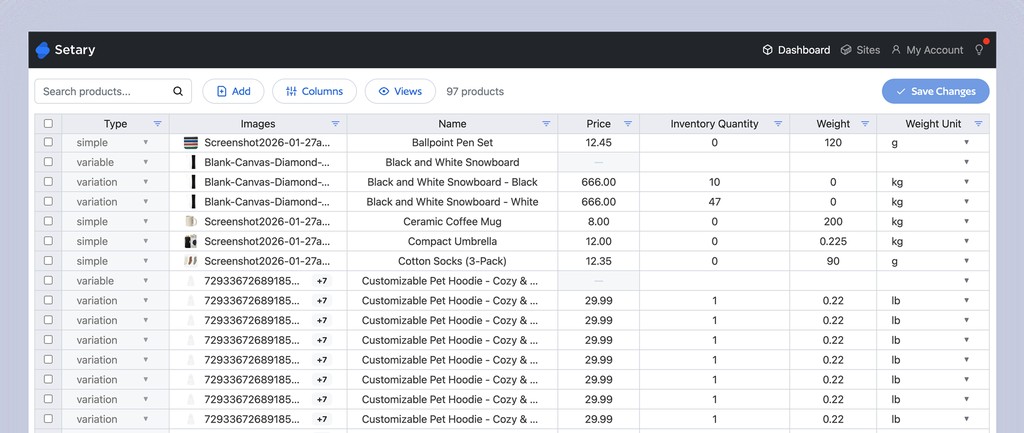
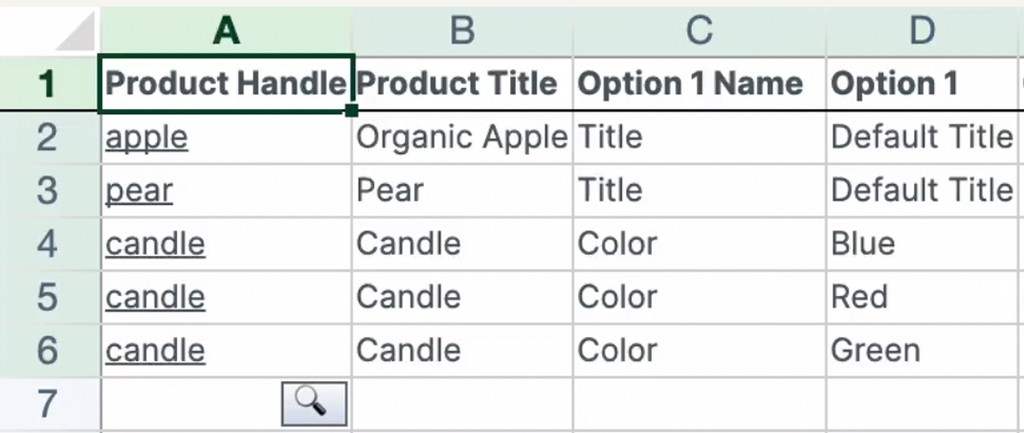
Both of the Shopify bulk editors display your products in a spreadsheet view. However, the spreadsheets are quite different, so you should choose which one you prefer.
Look at the column headers and you can see the difference straight away. Setary labels its columns Type, Images, Name, Price, Inventory Quantity and Weight, and the toolbar across the top is Search, Add, Columns, Views and Save Changes. (You can show and hide columns as needed.) Mixtable labels its columns A, B, C, D and numbers every row, then puts the Shopify field name in row 1 like a header row you typed yourself.
To me, that’s the key: Mixtable gives you a real spreadsheet and expects you to treat your catalog like a sheet of data. Setary gives you your catalog and puts spreadsheet controls around it.
There are pros and cons to each approach. In Mixtable you build the worksheet first, choosing which fields to load into which columns. In Setary there is nothing to build, because your products are already in the grid. You switch columns on and off from the Columns menu, and save your favorite “Views” for quick access later.
Formulas in Mixtable, Bulk Actions in Setary
Mixtable supports more than 150 Excel-compatible functions, including VLOOKUP, IF, ROUND and CONCAT. You drop a formula into a cell, double-click the fill handle and it runs down the column. It also has frozen panes, sorts, right-click menus and multiple worksheet tabs. Alongside the formulas it has a Bulk Edit Numbers dialog for straightforward price and inventory changes, with a preview of the first 10 rows.
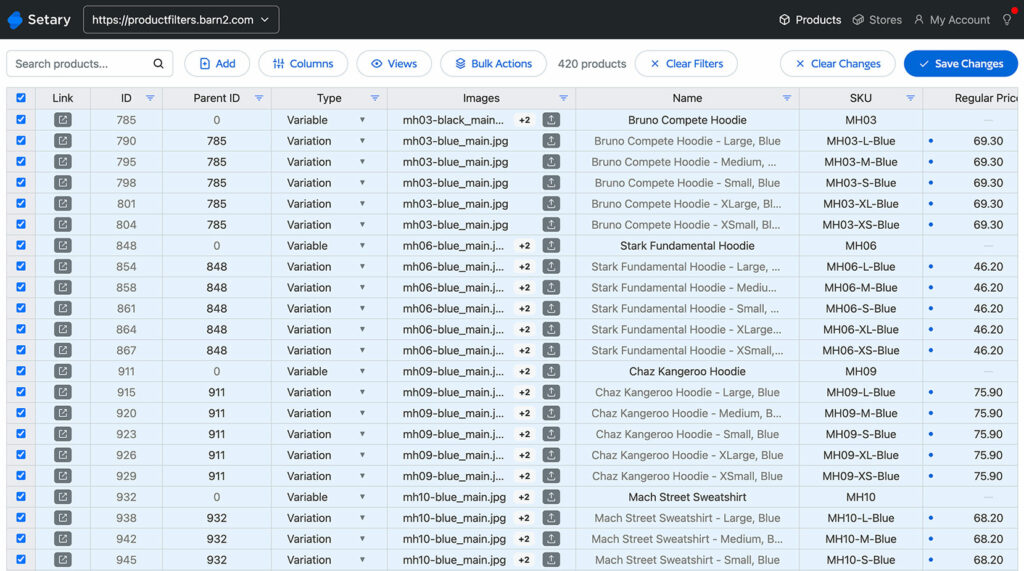
Setary has no formulas. If you want to calculate a new price with a VLOOKUP against a supplier sheet, then use Mixtable. Instead, Setary approaches the same change from the other end – through bulk actions. You filter to the rows you want and select a column:
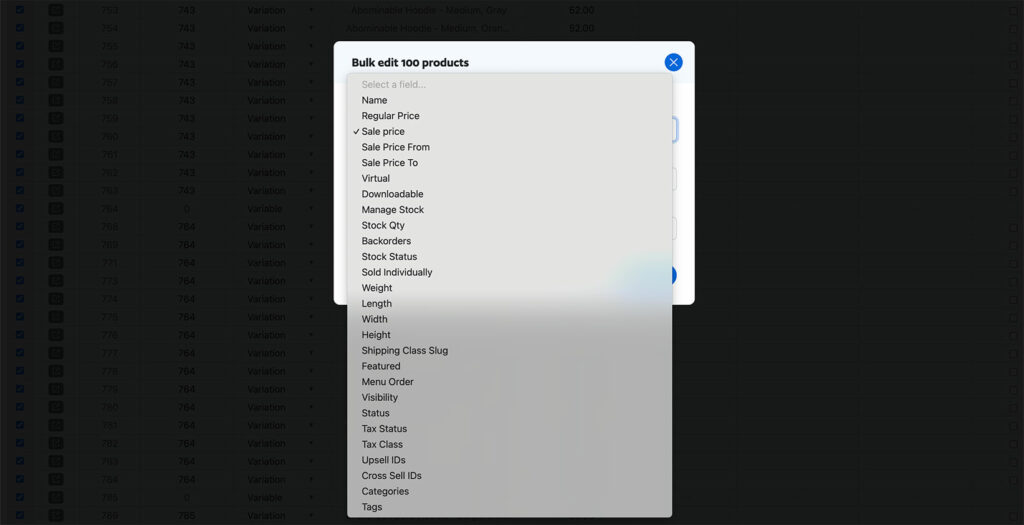
From there, you can set a value, clear it, append or replace text, or move prices by a percentage or a fixed amount:
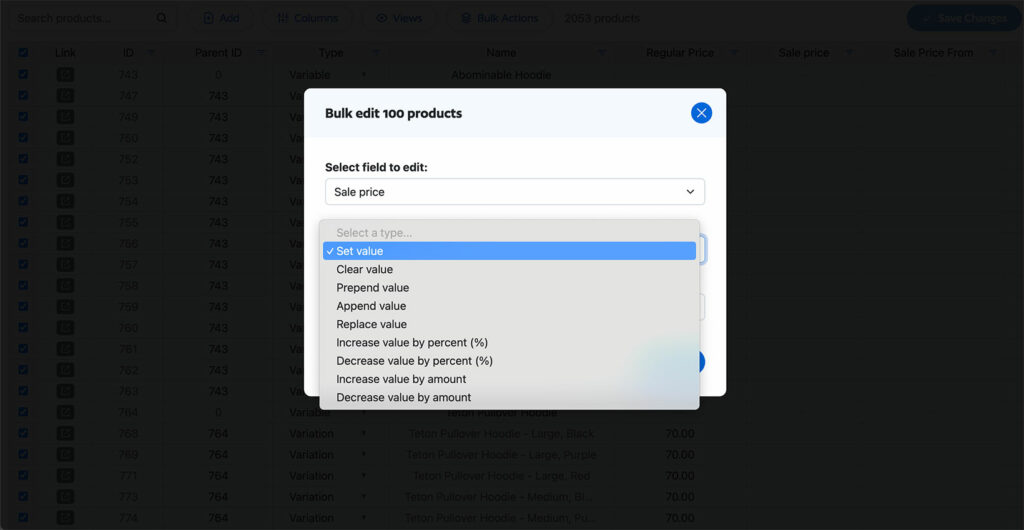
So both Setary and Mixtable allow bulk editing, but they have different approaches. If you already build spreadsheets with formulas, then Mixtable will feel familiar – and if you hate formulas, avoid it! If you want to filter, type and apply a change without writing a formula, Setary is the simpler of the two. Neither approach is better, and plenty of merchants would be happy in either.
Our guides to bulk editing Shopify products and editing Shopify variants walk through how to use the bulk actions in Setary.
Price: A Flat $9.99 vs a Price That Follows Your Shopify Plan
Setary costs $9.99 a month for Shopify, or $99 a year, with a 7-day free trial and a 30-day money-back guarantee. That is the only plan, and the price does not change as your store grows.
Mixtable sets its price from your Shopify plan. You pay $15 a month on Basic Shopify, $35 on Shopify and Advanced Shopify, and $49 on Shopify Plus. Its own bulk editor page puts it plainly: “Plans start at $15 per month and are matched to your Shopify plan, up to $49 per month for Shopify Plus.”
As a result, the two prices move apart as your store grows. On Basic Shopify you would pay Mixtable $15 and Setary $9.99, which is a difference of about $5 a month. Move up to Shopify Plus and you pay Mixtable $49 for the same editing capabilities, while Setary is still $9.99.
Neither app caps how many products you can edit on a paid plan. So the cap is not the deciding factor here, the way it is against Hextom or Matrixify. Mixtable has a free plan (unlike Setary), but it’s very limited – it lets you export to CSV and Excel and includes no editing at all.
What Each App Can Edit
Setary edits all of your product data. Every field on a product and its variants is editable in the grid: Titles, descriptions, prices and compare-at prices, inventory levels and tracking settings, SKUs, barcodes, weights, options, tags, images, product type and status, and metafields sitting in columns beside the rest. You can add products to a collection in a click, write descriptions in bulk with AI, and import or export CSVs.
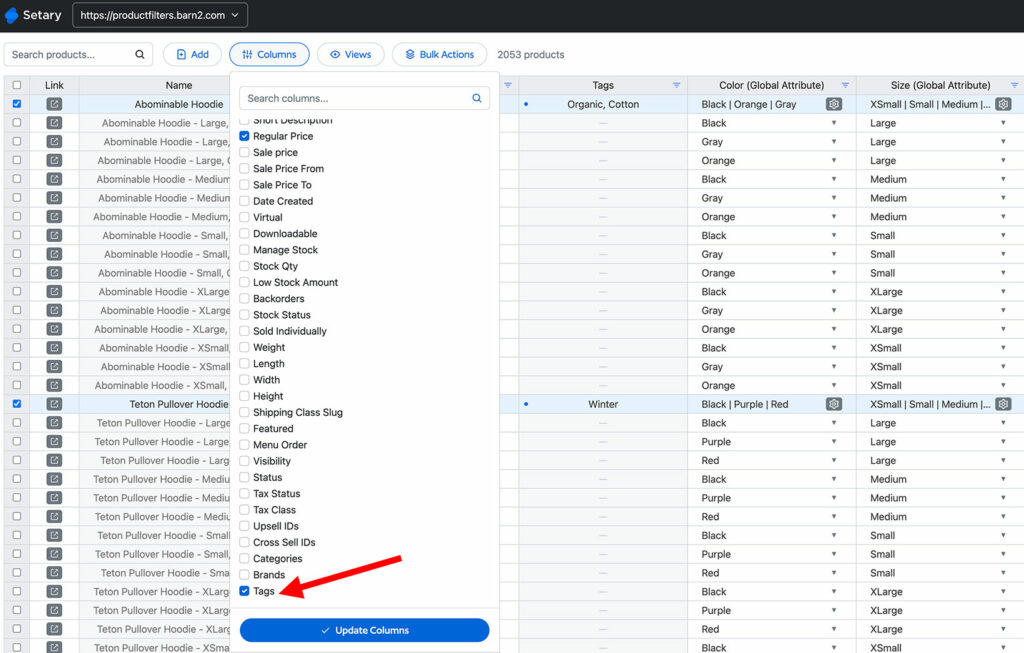
What Setary does not touch is anything outside the catalog. Mixtable does, and its App Store listing names orders, customers, collections, blog posts, metaobjects, SEO fields, B2B prices, international prices and translations. So if your bulk editing goes past products and variants, Setary cannot help you and Mixtable can. That is the main reason to pick Mixtable.
One thing neither app does is run edits on a schedule. Both apply your changes when you click. If you want a price change to go live at midnight, you will need a different app for it.
Setary Does Not Store Your Product Data
Setary reads your catalog through the Shopify API and displays it live in the spreadsheet editor. Nothing is copied into a Setary database for you to work on. When you approve a change we push it to your live store through the same API. We store neither your product data nor the changes you make to it.
Mixtable works the other way round, by design. You build a worksheet and it stays there between sessions. Its App Store listing describes the flow as “Store data loads automatically. Make changes, review them, then sync to Shopify”, and the app lists backup among the things it does for you.
That saved worksheet is what buys Mixtable its best features. A formula has to sit somewhere, cell history has to have a stored history to show you, and you cannot restore a backup that was never kept. So this is not a warning about Mixtable. Setary keeps nothing, so no second copy of your catalog sits in anyone else’s database. It also means there is nothing to roll back to once you sync.
Multiple Shopify Stores from One Setary Login
If you run more than one Shopify store, then you can bulk edit each one from the same Setary login. You install Setary for Shopify from each store you want to edit, then link those stores to the same account. They appear in the store switcher at the top right. You jump between them in a click and apply the same inventory and pricing updates across all of them in one pass.
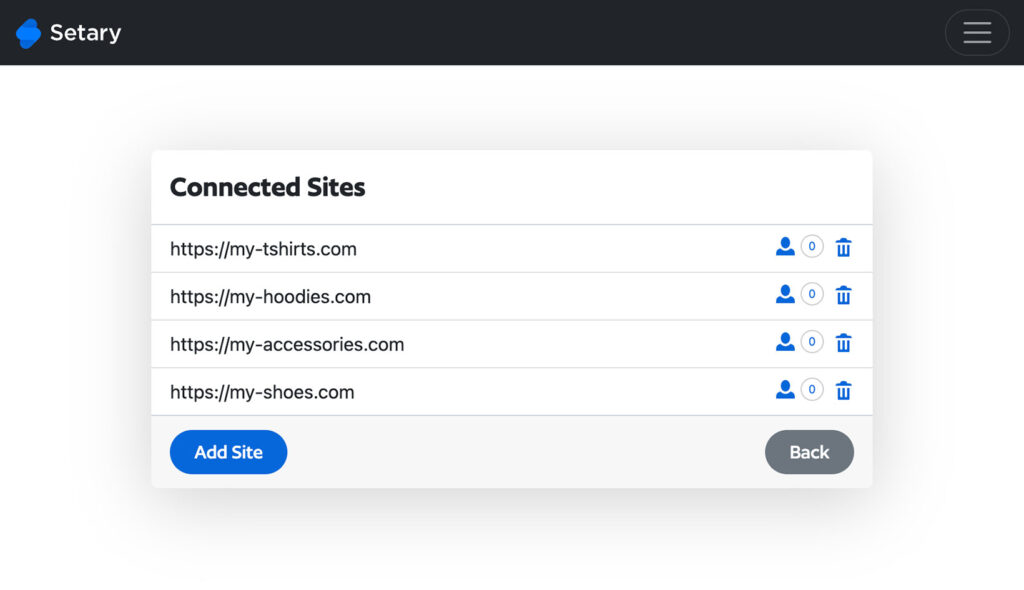
Each store installs the app from the Shopify App Store and is billed separately through Shopify, so it is one login and one grid at $9.99 per connected store. Three stores come to $29.97 a month rather than $9.99. This suits agencies running client stores, merchants with a separate store per region or brand, and anyone running a wholesale store alongside a retail one.
As far as we know, Mixtable does not offer anything equivalent. We looked for a store switcher and could not see a way to do this, and it is not documented anywhere on their site. If you run one store then none of this applies to you either way.
Setary Also Edits WooCommerce and WordPress
Setary uses the same spreadsheet, columns, filters and bulk actions whichever platform the products come from, so you learn one app instead of two. Your Shopify, WooCommerce and WordPress stores all sit under one login, in the same store switcher at the top right. For an agency with clients on both platforms, that is one way of working across every client.
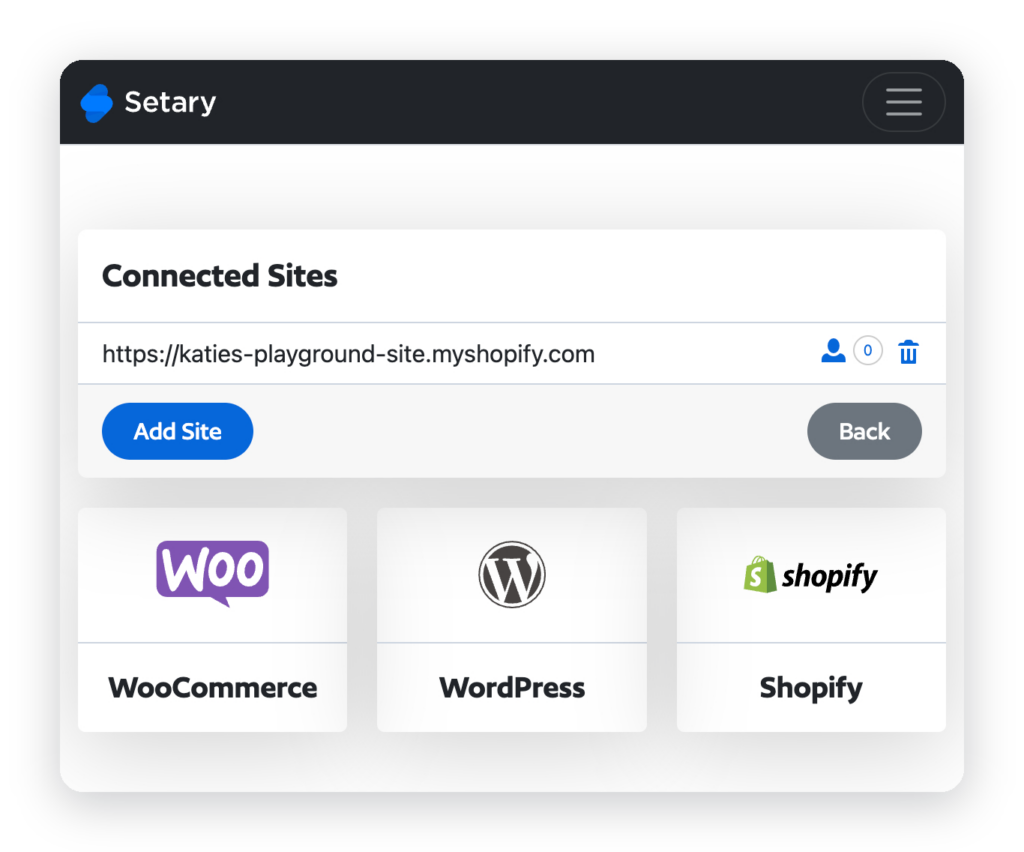
Billing is separate for each platform, because Shopify handles its own. You pay $9.99 a month through Shopify, and WooCommerce and WordPress are billed by Setary from $144 a year for one site. Mixtable is Shopify only, so if you have a WooCommerce store as well then you would need a separate tool for it (maybe Setary!).
Where Mixtable Is Stronger
- Excel formulas – Mixtable supports more than 150 Excel-compatible functions in the grid, including VLOOKUP, IF, ROUND and CONCAT. It also has a fill handle you drag down a column. Setary has none of that.
- It runs inside the Shopify admin – Mixtable opens as an embedded app, so you never leave Shopify. Setary opens at setary.com/app in its own tab.
- Built for Shopify – Mixtable has the badge. Setary cannot get it, because the badge requires the primary workflow to run inside the Shopify admin.
- Far more than products – Orders, customers, collections, blog posts, pages, metaobjects, B2B and international prices, and translations are all in range for Mixtable. Setary covers every product and variant field, and stops there.
- Analytics – Mixtable sells a separate Analytics Spreadsheet app from $29 a month, with live sales metrics that update as orders come in. Setary has nothing comparable.
- Reviews and age – Mixtable has been on the Shopify App Store since December 2020 and holds 4.6 stars from 36 reviews. Setary has been available for WooCommerce for several years, but only launched for Shopify in June 2026 and has no Shopify reviews yet.
- A free plan – Mixtable’s free plan exports to CSV and Excel forever. Setary has a 7-day trial and no free tier.
On the ratings, I would not read too much into 4.6 against Setary being new to Shopify. 36 reviews is a small sample either way. A rating built on that few tells you very little about an app you are about to run your whole catalog through. Try both and judge which you prefer.
Where Setary Is Stronger
- A price that stays put – Setary is $9.99 a month on every Shopify plan. Mixtable is $15 on Basic Shopify and $49 on Shopify Plus, so the same editing work costs you more as your store grows.
- WooCommerce and WordPress – Setary edits live WooCommerce stores and WordPress sites in the same grid, under the same login. Mixtable is Shopify only.
- Several stores behind one switcher – Connect every Shopify store to one Setary login and move between them from the store switcher, applying the same pricing and inventory updates across all of them in one pass.
- AI product descriptions – Setary writes and rewrites Shopify product descriptions in bulk from inside the grid. As far as we know, Mixtable has nothing equivalent. We looked for it and could not find it documented anywhere.
- Nothing to set up – Your catalog is in the grid the moment you install the app, with saved Views for the filters and columns you use often. In Mixtable you build the worksheet first.
- No copy of your data – Setary reads and writes through the Shopify API and stores nothing, which matters if you would rather your pricing and supplier SKUs did not sit in a second database.
FAQ
Is Setary cheaper than Mixtable?
Yes, and the gap widens as your store grows. Setary is $9.99 a month on every Shopify plan. Mixtable is $15 on Basic Shopify, $35 on Shopify and Advanced Shopify, and $49 on Shopify Plus. Setary bills per connected store, so compare them per store.
What can Setary do that Mixtable cannot?
Three things. Setary edits live WooCommerce and WordPress stores from the same app. It puts several Shopify stores behind one store switcher. It also writes product descriptions in bulk with built-in AI.
What can Mixtable do that Setary cannot?
Quite a lot. Mixtable runs Excel formulas in the grid and edits orders, customers, collections, blog posts and pages. It also opens inside your Shopify admin, carries the Built for Shopify badge and sells a separate analytics spreadsheet.
Can either app schedule a bulk edit?
No. Neither Setary nor Mixtable runs edits on a schedule. Both apply your changes when you click, so a timed price change needs a different app.
Does Setary have a product limit?
No. Our Shopify FAQ states that “You can edit an unlimited number of Shopify products and variants.” The $9.99 plan is not capped by product count, and there is no separate variant cap.
Can I try Setary before paying?
Yes. Setary has a 7-day free trial when you install the app from the Shopify App Store, plus a 30-day money-back guarantee. You can also try the demo for 48 hours with no install and no card, using a store already filled with dummy data.
Choose the Right Bulk Editor for Your Store
Mixtable is the better app if you want Excel formulas in the grid. The same goes if you edit orders, customers or content as well as products, or if you want the editor to open inside your Shopify admin. It has the Built for Shopify badge, an analytics spreadsheet alongside the editor and nearly six years on the App Store. None of that is in question here.
Setary is the better app if your week is spent on products and variants and you want the price to stay put. You filter, type and apply a bulk action without building a formula. You pay $9.99 whichever Shopify plan you are on, and you can edit your WooCommerce and WordPress stores from the same login.
Both apps have a 7-day trial. The quickest way to decide is to load your own catalog into each one and make the edit you make most often. You can compare the plans on the Setary pricing page before you start.
Bulk edit anything in WordPress, WooCommerce and Shopify
Try our demo now and discover how you could save thousands of hours managing your site.
or try the demo