
Both the Setary and Ablestar apps are designed to bulk edit Shopify products. If you are comparing Setary vs Ablestar then the choice is about price, working style, and whether you need automation.
Setary is a live spreadsheet for hands-on catalog work, whereas Ablestar has stronger scheduling, history and sync features. Setary launched in June 2026, while Ablestar Bulk Product Editor has been on the Shopify App Store since July 2017. We are Setary, so this page is written from our side of the comparison. Keep reading for an honest comparison and advice on when you should choose each app.
The Short Answer
Choose Setary if:
- You want a live grid, not edit forms.
- You are paying for editing only: $9.99 a month against $30.
- You also run WooCommerce or WordPress.
- You have a few hundred to a few thousand products.
- You don’t want the app to store your product data on their servers.
Choose Ablestar if:
- You need scheduled or recurring edits.
- You want retained edit history, from 60 to 180 days.
- You want supplier-file inventory sync from Drive, Dropbox, FTP or a URL.
- You want to work inside the Shopify admin.
- You want a permanent free tier for up to 10 products.
Setary vs Ablestar Comparison Table
| Feature | Setary | Ablestar Bulk Product Editor |
|---|---|---|
| Cheapest paid plan | $9.99 / month, or $99 / year | $30 / month |
| Free plan | None. 7-day trial, plus a 48-hour demo store with no install | Yes, up to 10 products |
| Product limit on the cheapest paid plan | No limit | No limit (unlimited per task from $30) |
| How you edit | Live spreadsheet grid, edited inline | Edit forms, field by field, plus spreadsheet export and upload |
| What it edits | Products and variants, plus product metafields | Products, variants, metafields, collections |
| Bulk actions | Set, append, replace, price by percent or amount | Rules and placeholders, multiple modifications per edit |
| AI description writing | Yes, built in | No AI descriptions, but works with Shopify Sidekick |
| Scheduled edits | No | Yes, from $30 |
| Recurring edits | No | Yes, from $60 |
| Undo | Yes, before changes are committed | Yes, one click after an edit |
| Edit history retention | No rollback after you sync | 60 days at $30, 90 at $60, 180 at $120 |
| Inventory sync from Drive, Dropbox, FTP or URL | No | Yes, from $30 |
| Where it runs | setary.com/app | Inside the Shopify admin, including from the Shopify product list |
| Multiple Shopify stores from one login | Yes, with a store switcher | Not that we could find, and not documented |
| Also edits WooCommerce and WordPress | Yes, separate subscription | No, Shopify only |
| Shopify App Store rating | No reviews yet | 4.9 from 918 reviews |
| On the App Store since | 25 June 2026 | 31 July 2017 |
These figures were checked on 27 September 2026. Shopify App Store ratings and prices can change.
Price: A Cheaper Ablestar Alternative for the Same Bulk Edits
Setary costs $9.99 a month, or $99 a year. It has one Shopify plan.
Ablestar Bulk Product Editor pricing starts at $30 a month for the Basic plan. Ablestar also has a free Starter plan, but that plan is capped at 10 products. As a result, $30 is the first Ablestar plan that works for a real catalog.
For a genuine like-for-like comparison, you’re looking at $9.99 for Setary against $30 for Ablestar. Setary lets you edit an unlimited number of Shopify products and variants at $9.99, while Ablestar starts unlimited products per task at $30. Ablestar’s $60 and $120 plans buy automation, not extra editing capabilities.
The yearly comparison is $99 for Setary against $360 at Ablestar’s $30 monthly rate multiplied by 12. Ablestar does not offer an annual price.
You can also sign up for a Setary demo store for 48 hours, with dummy data and no card.
Working Method: A Grid You Type Into vs. a Form You Configure
Ablestar is built around configured edits. You filter or search to select products, choose ‘Edit products’, pick a ‘Field to edit’, choose ‘How to edit’, preview and run the edit. A second field becomes another modification in its own tab.
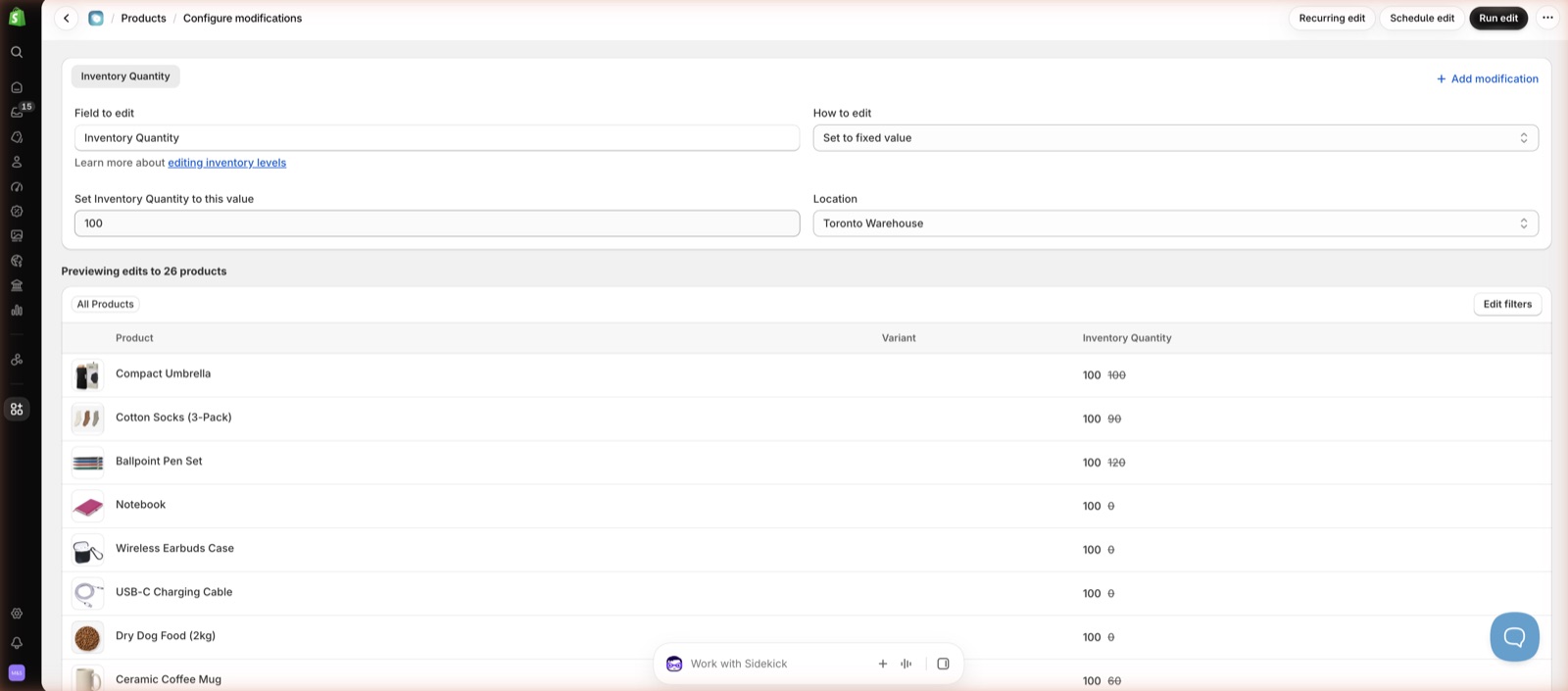
That method is strong when you need to make rule-based changes. For example, you might add a tag to every product under $15 or reduce every product in a collection by 20%.
Setary works differently: It displays your Shopify product catalog as one editable grid. Every product and variant appears as a row within the spreadsheet, with whichever columns of product data you wish to include.
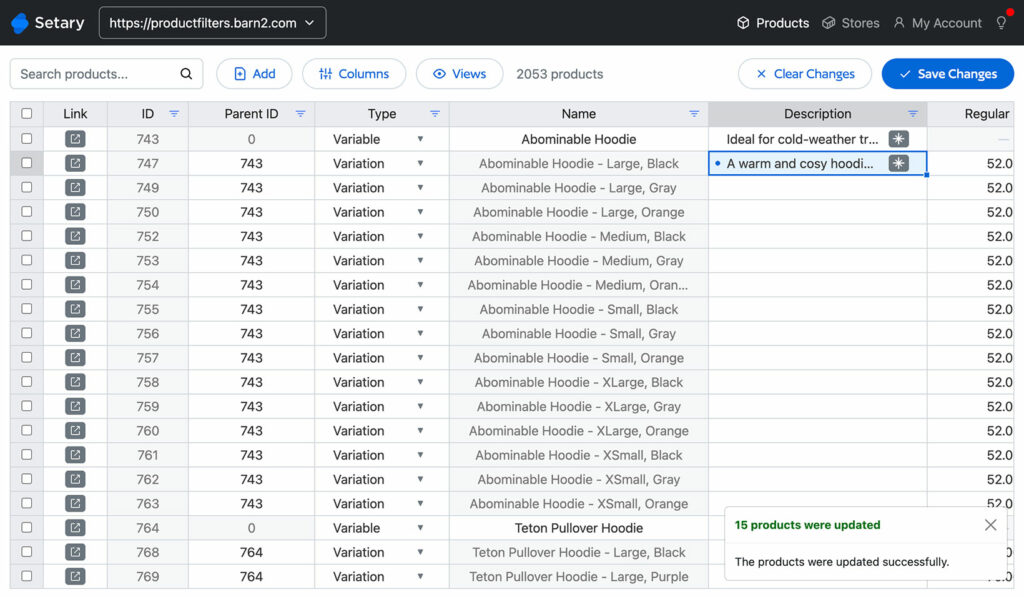
Setary’s live grid is better for inline changes and quick bulk edits. For example, you might have 40 products with different prices, descriptions to fix one by one, or you need to bulk edit SKUs against nearby data. In Ablestar, that usually means separate edits or a spreadsheet export and upload.
Setary also has bulk actions for rule-shaped changes: Set, append, replace and change prices by a percent or fixed amount. Our guides to bulk editing Shopify products, editing Shopify variants and exporting Shopify products provide more detail about this.
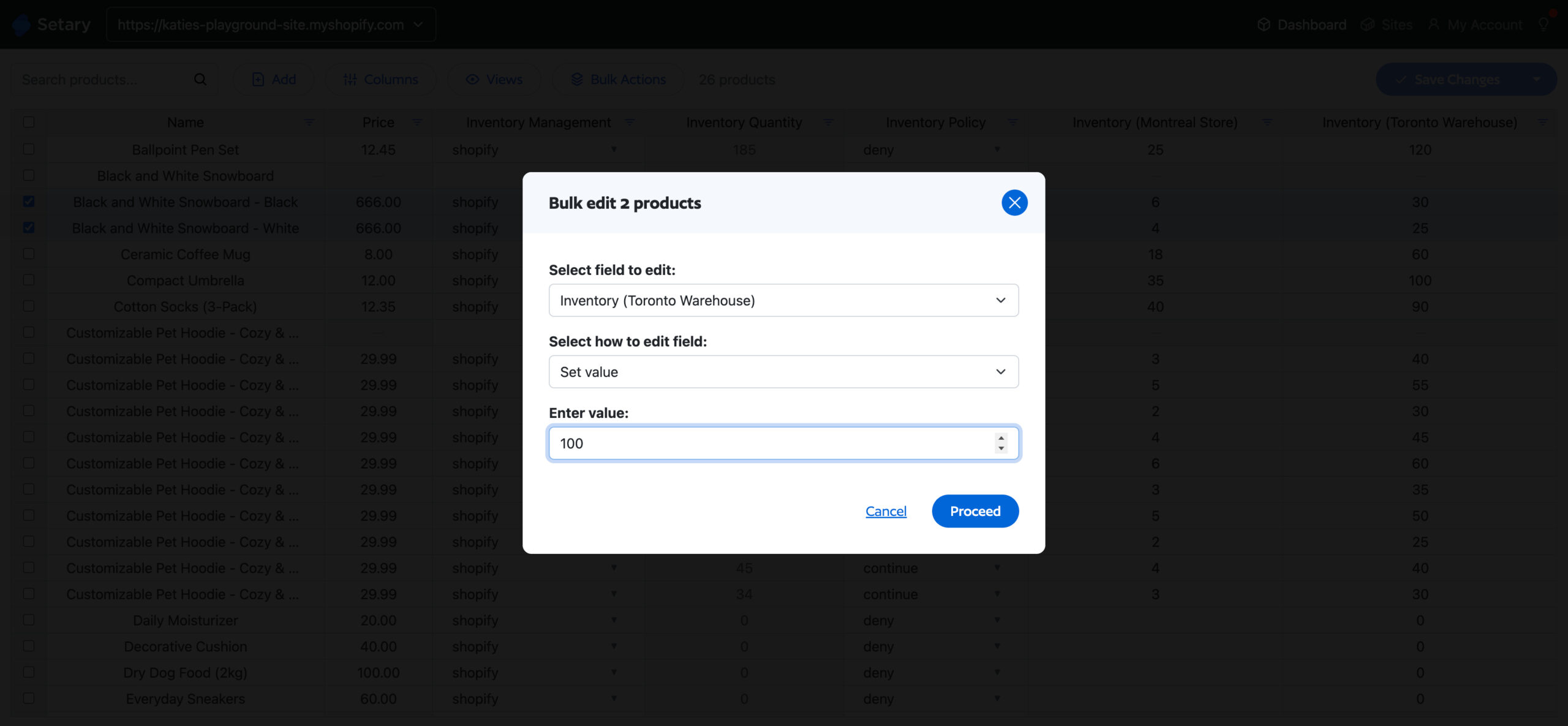
With Ablestar, the spreadsheet is a file you export and upload. With Setary, the spreadsheet is the app. The Setary docs cover setup.
Setary Does Not Store Your Product Data
Setary does not store your product data. It uses the Shopify API to display your products live in the Setary spreadsheet editor.
Once you have reviewed and approved the changes in the spreadsheet, Setary pushes them to your live store through the same API. Setary does not store the changes, and it does not store your product data.
That is a security benefit. There is no second copy of your catalog sitting in another company’s database.
Ablestar takes a different approach – their documentation say their bulk editor “keeps a live copy of your product data in its database.” This copy lets you undo edits, run advanced searches and export data faster. It’s also what makes Ablestar’s retained edit history and scheduled edits possible.
Ablestar says the copy is stored on secured Google Cloud servers, which is the same hosting provider Shopify uses. Ablestar also says the app does not have access to order or customer information, and that it removes any personal information it collects 48 hours after you uninstall the app.
For a merchant who would rather no second copy of their catalog existed anywhere, Setary’s live-sync approach is the best option.
Multiple Shopify Stores from One Setary Login
Setary is also built for merchants running more than one Shopify store. You sign up to Setary for Shopify from each of the stores you want to bulk edit.
You then link those stores so they all appear in the stores dropdown in the top right of Setary. Use that dropdown to sync changes across the products and variants in multiple stores. This is a huge time-saver for merchants running more than one Shopify store, as well as agencies that need to move between client stores from one Setary login.
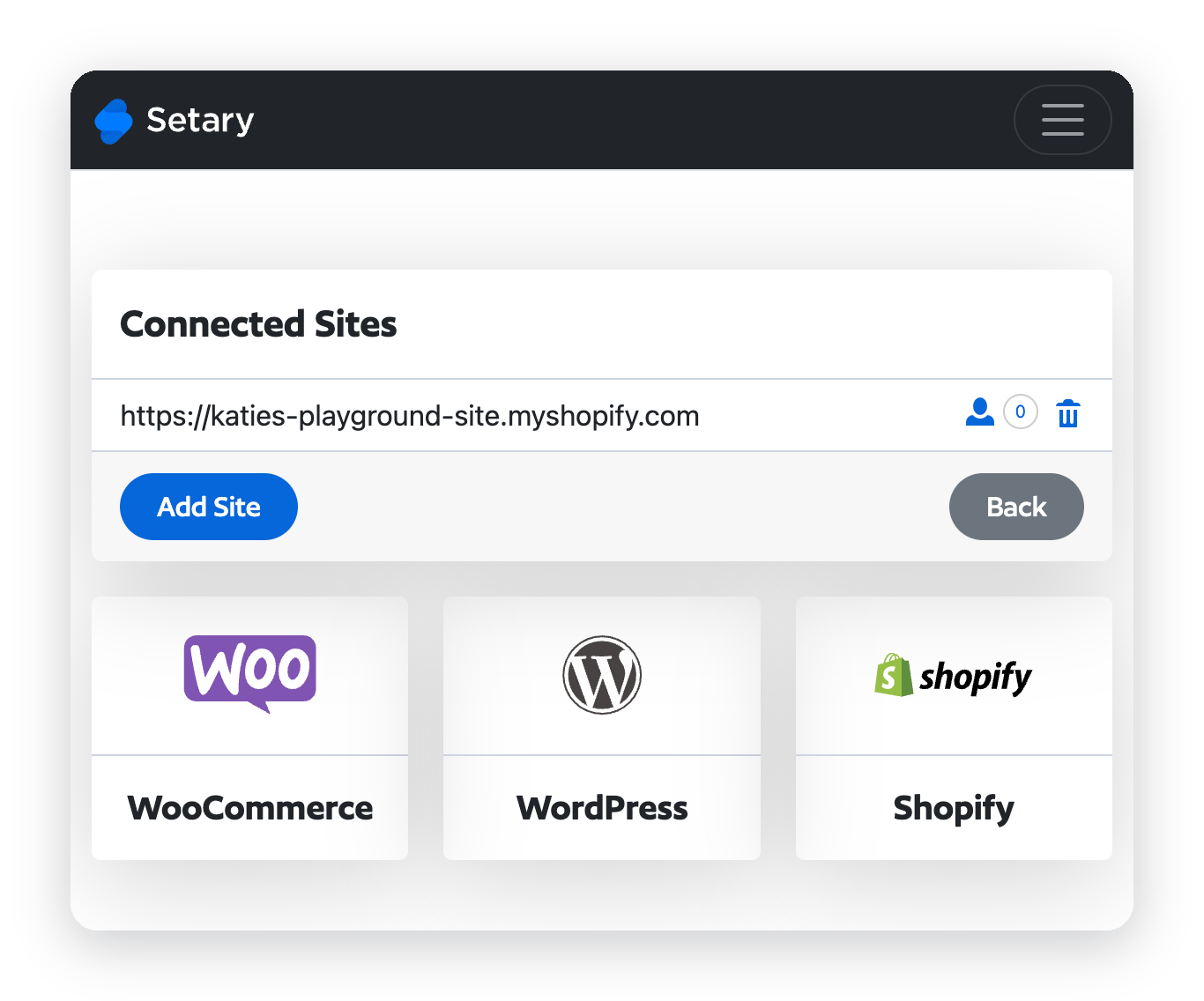
Setary costs $9.99 per connected Shopify store, and each store is billed separately. For example, if you connect three stores, you pay $29.97 while managing them from one login and one grid. In contrast, Ablestar is $30 per store, so three stores means three separate installations and three separate subscriptions costing $90. As a result, Setary remains roughly three times cheaper whether you manage one store or three.
As far as we know, Ablestar does not do multi-store. We tested it, we could not see a way to do this, and it is not documented anywhere. Ablestar’s FAQ, pricing page and App Store listing do not mention multiple stores.
Setary Also Edits WooCommerce and WordPress
Setary is also the better choice if you need to sync product data between Shopify and WooCommerce stores. It uses the same spreadsheet, columns, filters and bulk actions whichever platform the products come from.
As a result, you learn one tool instead of two and can sync data between your stores. Your Shopify, WooCommerce and WordPress stores sit in the same store switcher, so you do not switch accounts or change how you work when you move from a Shopify catalog to a WooCommerce one.
Billing is separate per platform. Shopify is billed through Shopify. WooCommerce and WordPress are billed by Setary from $144 a year for one site.
Ablestar is Shopify only. It also sells a WooCommerce Importer for moving WooCommerce into Shopify. In contrast, Setary lets you edit both platforms in the same app.
For an agency with clients on Shopify and WooCommerce, that gives you one workflow across every client instead of a different app per platform.
Where Ablestar Is Stronger
- Reviews and age – Ablestar has 918 reviews at 4.9, with 881 five-star reviews and 10 one-star reviews. Setary has been available for WooCommerce for several years, but only launched for Shopify on 25 June 2026.
- Built for Shopify – Ablestar has the badge. Setary cannot get it because the badge requires the primary workflow to run inside the Shopify admin, and Setary runs at setary.com/app.
- Shopify admin access – Ablestar runs inside the Shopify admin, including from Shopify’s product list. You can select products, click the three dots and choose Ablestar’s ‘Bulk edit’ entry under Apps. With Setary, you log in at setary.com/app to access the bulk editor.
- Scheduled and recurring edits – Ablestar has scheduled edits from $30 and recurring edits from $60. Setary has neither.
- Retained edit history – Ablestar keeps 60 days at $30, 90 days at $60 and 180 days at $120. Setary allows you to preview and undo changes before you make them live, but there is no rollback after you sync your edits with your live store.
- Free tier – Ablestar has a permanently free tier for 10 products. It also says dev stores have no limits until launch, which lets agencies test client stores before they go live. Setary offers a 7-day free trial and a live demo store with no install and no card. Its demo has dummy data for 48 hours.
- More than products – Ablestar’s listing tags collections as editable and sells inventory sync from Google Drive, Dropbox, FTP and a URL, scheduled exports, automatic product rules and Liquid code snippets. Setary’s listing tags products and variants only, although Setary can add products to a collection as a bulk action. If you need file-source inventory sync, Ablestar is stronger.
Which One to Pick
If You Have 500 to 3,000 Products and Do Your Own Catalog Work
Setary is the better fit if you look through product data and make changes by hand. The $9.99 plan gives you the live grid, unlimited Shopify products and variants, and bulk actions.
This is the closest match for a cheaper Ablestar alternative. You give up scheduled edits, recurring edits and retained history, and pay less for editing.
If You Need Automation While You Are Away from Your Desk
Ablestar is better if a sale needs to start Friday and revert Monday while you are away. It is also better if a supplier file syncs nightly from Drive, Dropbox, FTP or a URL.
Those jobs are Ablestar’s strength. Setary is a live editing workspace, and it does not run scheduled edits or supplier-file syncs.
If You Run Multiple Stores, or Shopify and WooCommerce Together
Setary is the better fit if you need Shopify and WooCommerce from one login. A Shopify-only app cannot edit WooCommerce.
You still pay separately for each platform. However, the store switcher puts Shopify, WooCommerce and WordPress in one Setary account.
FAQ
Is Setary cheaper than Ablestar?
Yes. Setary costs $9.99 a month, or $99 a year, while Ablestar’s cheapest paid plan is $30 a month. Ablestar also has a free Starter plan, but it is capped at 10 products. For a real catalog, the paid-plan comparison is $9.99 against $30.
What can Setary do that Ablestar cannot?
Setary gives you a live spreadsheet grid, $9.99 pricing with no product cap, multiple Shopify stores from one login, WooCommerce and WordPress from the same login, AI description writing and a setup where Setary does not store your product data. Ablestar covers different jobs, especially automation and retained edit history.
What can Ablestar do that Setary cannot?
Ablestar has scheduled edits, recurring edits, retained edit history, inventory sync from Drive, Dropbox, FTP or a URL, a free 10-product tier and the Built for Shopify badge. Setary does not offer those features. If those are your buying criteria, Ablestar is the stronger app.
Can Setary edit WooCommerce as well as Shopify?
Yes. Setary edits Shopify, WooCommerce and WordPress from one login, with a store switcher. The subscriptions are separate: Shopify is billed through Shopify, and WooCommerce or WordPress is billed by Setary from $144 a year for one site on the entry plan.
Does Setary have a product limit?
No. Setary’s Shopify FAQ says, “You can edit an unlimited number of Shopify products and variants.” The $9.99 Shopify plan is not capped by product count. There is no separate variant cap either.
Can I try Setary before paying?
Yes. Setary has a 7-day free trial when you install the app from the Shopify App Store. You can also try the demo for 48 hours with no install and no card, using a store already filled with dummy data.
Choose the Right Bulk Editor for Your Store
Your best bulk edit app depends on how you prefer to work, what you need to automate, and which platforms you run. Ablestar is the better choice if you need scheduled or recurring edits, retained edit history, or a configured edit form instead of a live grid.
Setary is stronger if you want a lower starting price, at $9.99 a month against Ablestar’s $30 paid plan, or if you run more than one Shopify store and want them in one account. Setary also makes more sense if you edit WooCommerce or WordPress as well as Shopify, or if you prefer an app that does not hold a copy of your product data.
You can compare the plans on the Setary pricing page before deciding which setup fits your store. If Ablestar is not the only app on your shortlist, there are also comparisons of Setary against Matrixify, Hextom and Mixtable.
Bulk edit anything in WordPress, WooCommerce and Shopify
Try our demo now and discover how you could save thousands of hours managing your site.
or try the demo