
Setary and Hextom both bulk edit Shopify products, and both charge $9.99 a month to start. So the comparison comes down to how many products you can change at once, and how you go about changing them.
On Hextom‘s $9.99 Basic plan, a single bulk edit covers up to 500 products. Setary loads your whole catalog into a spreadsheet and has no product limit at any price. If you sell more than a few hundred products, you meet that difference every time you run a sale.
Hextom is the older and broader app. It arrived on the Shopify App Store in October 2015, holds 4.9 stars from 1,156 reviews, and bulk edits orders, collections and customers as well as products. Setary has been available for WooCommerce for years, and opened for Shopify in June 2026. It edits products and variants only.
We build Setary, so you are reading our side of this. Every Hextom figure here comes from its published plan limits and its own documentation, and I have said plainly where Hextom is the better buy. If you want your edits to repeat on a schedule, then you should use Hextom.
The Short Answer
Choose between Setary and Hextom base on your catalog size and the kind of data you edit.
Setary suits you if:
- You change more than 500 products at a time.
- You would rather use a spreadsheet to filter and edit products than describe what you want as a set of conditions.
- You often cannot tell which products need editing until you look at them.
- You would rather no third party held a copy of your product data.
- You sell on WooCommerce or WordPress as well as Shopify.
Hextom suits you if:
- Your bulk edits reach past products and variants, to orders, collections or customers.
- You want a weekly repricing or a stock sync to fire without you.
- You want to undo an edit weeks after you ran it.
- You do most of your store admin in one browser tab and want to keep it that way.
- You want an app with eleven years and 1,156 reviews behind it.
Setary vs Hextom Comparison Table
| Feature | Setary | Hextom |
|---|---|---|
| Cheapest paid plan | $9.99 / month per store, or $99 / year | $9.99 / month per store |
| Products per edit on that plan | No limit | 500 |
| Products per edit on the top plan | No limit, there is only one plan | 50,000, at $49.99 / month |
| Number of edits you can run | Unlimited | Unlimited |
| Free plan | None. 7-day trial, plus a 48-hour demo store with no install | Yes, 10 products per task |
| How you pick the products | Sort, filter and select rows on screen | Write conditions, then preview what they matched |
| How you make the change | Type into the cell, or apply a bulk action | Choose a field and a rule, then run the task |
| Editing grid inside the app | Yes | No |
| What it edits | Products and variants, plus product metafields | Products, variants, orders, collections, images, inventory, tags, descriptions, SKUs and barcodes, and metafields |
| Scheduled and repeating edits | No | 10 on the $19.99 plan, 100 on the $49.99 plan, none below that |
| Undo before the change goes live | Yes | Preview of the products the conditions matched |
| Undo after the change is live | No | Yes, for 30 to 180 days depending on the plan |
| Keeps a copy of your product data | No | Yes, the old values behind every task |
| Where you work | A separate tab at setary.com/app | Inside the Shopify admin |
| Several Shopify stores from one login | Yes, through a store switcher | Yes, multi-store is listed on its App Store listing |
| Also edits WooCommerce and WordPress | Yes, on a separate subscription | No, Shopify only |
| Shopify App Store rating | No reviews yet | 4.9 from 1,156 reviews |
| On the App Store since | 25 June 2026 | 5 October 2015 |
These figures were checked on 29 September 2026. Shopify App Store ratings and prices can change.
Both Apps Cost $9.99, So What’s the Difference?
Hextom sells four plans, and the number that changes between them is how many products one task is allowed to touch. The free Demo plan stops at 10 per task. Basic at $9.99 stops at 500, Professional at $19.99 stops at 5,000, and Advanced at $49.99 stops at 50,000.
Every plan lets you run as many tasks as you like, so nobody is charging you for a second attempt. However, a bulk update beyond your plan’s limit has to be broken into pieces and run in stages, which is time-consuming and error-prone.
Setary sells one plan at $9.99 with no product limit, so your catalog size never changes the price or the number of passes. Here is how that works out at five common store sizes:
| Products in one edit | Hextom $9.99 | Hextom $19.99 | Hextom $49.99 | Setary $9.99 |
|---|---|---|---|---|
| 400 | 1 task | 1 task | 1 task | 1 pass |
| 2,000 | 4 tasks | 1 task | 1 task | 1 pass |
| 5,000 | 10 tasks | 1 task | 1 task | 1 pass |
| 12,000 | 24 tasks | 3 tasks | 1 task | 1 pass |
| 60,000 | 120 tasks | 12 tasks | 2 tasks | 1 pass |
Under 500 products the limit never appears and the two apps cost you the same. Above it, you either repeat yourself or move up a plan. Going from $9.99 to $19.99 costs $239.88 a year instead of $119.88, and the extra $120 raises a number rather than adding a feature.
Four Tasks or One Pass: Increasing Prices by 10%
Take a store with 2,000 products and a weekend sale to set up. In Hextom on the $9.99 plan, each round looks like this:
- Pick the field you want to change, which is the price.
- Write the conditions that match the products, then preview what they found.
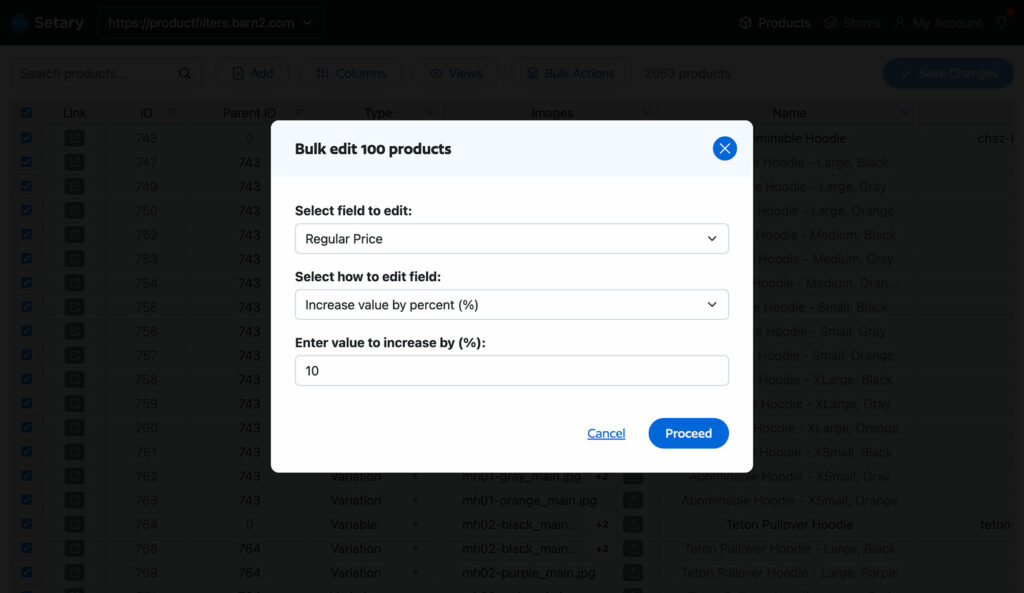
- Choose the change, in this case an increase of 10%.
- Click ‘Start Bulk Edit Now’. Hextom’s guide says the task then queues on its servers and runs within a few minutes.
Because the plan stops at 500, you do that four times, and each set of conditions has to pick up where the last one finished. Come Monday you do it four more times to take the prices back down. That is eight builds for one sale, and the work sits in the setting up rather than the running.
Setary only requires one pass. You filter the grid to the products you want, save the view if it is one you will use again, select the price column and apply a percentage or a fixed amount. You see the new prices in the rows, then click Update to send them to Shopify. Reversing it on Monday is the same handful of clicks.
Our guides to bulk editing Shopify products and editing Shopify inventory in bulk go through the other ways to handle a sale like this.
A Spreadsheet You Type Into, or a Form You Fill In?
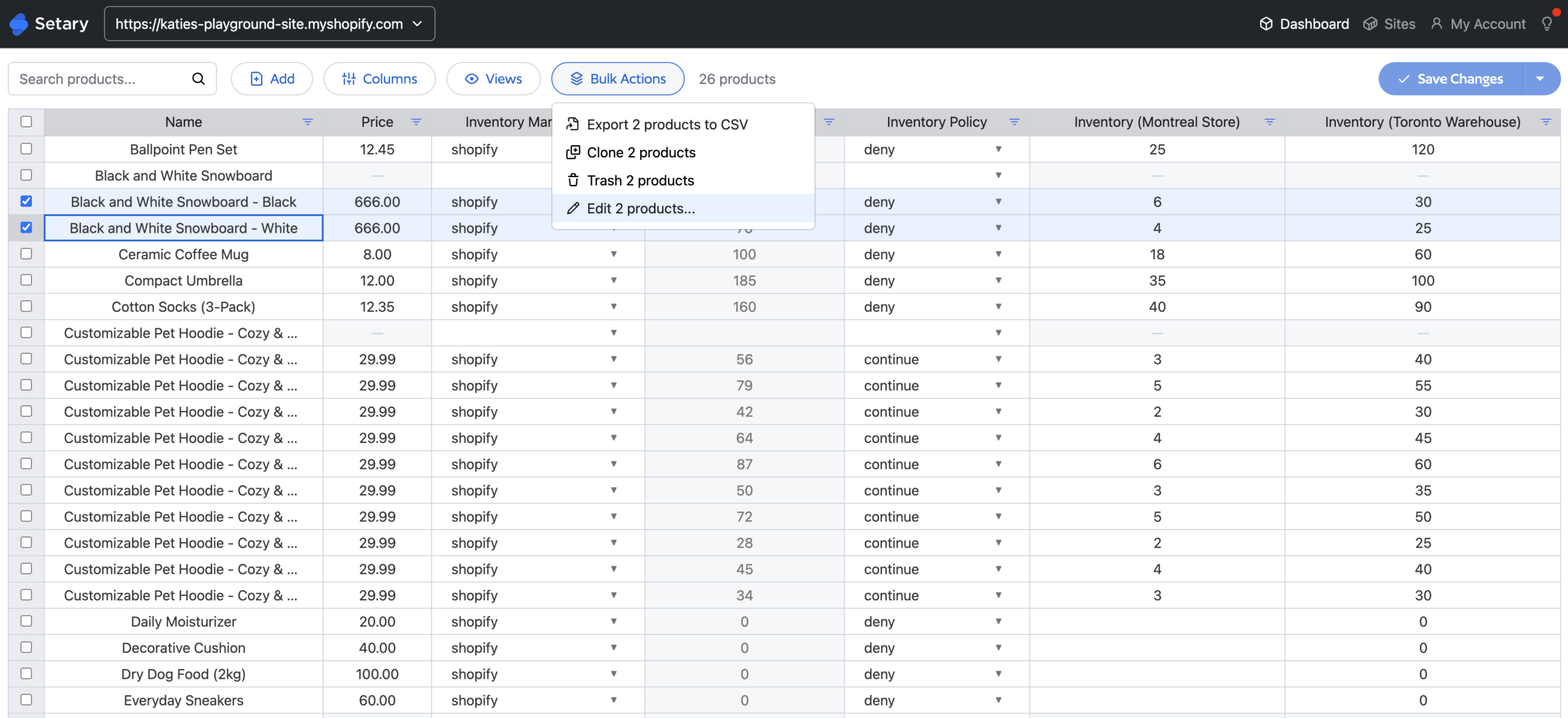
Hextom never puts your catalog on the screen. You begin a bulk edit by describing the products you want, on a screen headed ‘Set conditions to find products for editing’. The screen after it lists whatever those conditions matched, ten products to a page, and none of it can be edited. It is there so you can check you aimed correctly before the task runs.
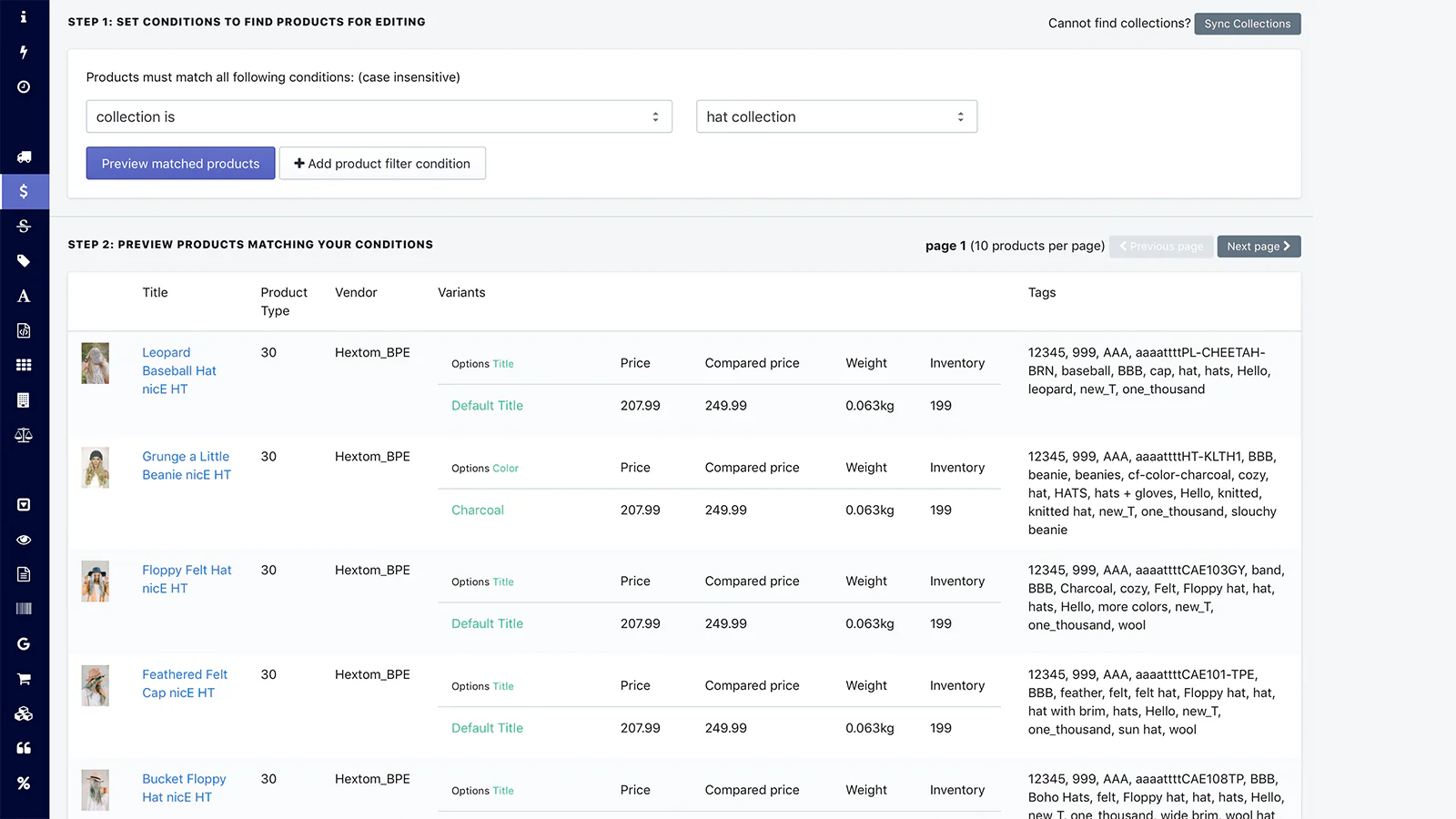
That works well for rule-based changes. Adding a tag to every product under $15, or taking 20% off a whole collection, is a few fields and a click. On its higher plans Hextom will repeat the same rule on a schedule for you.
Setary is a spreadsheet. Your Shopify catalog opens as a grid, one row for every product and every variant, with whichever columns of product data you want in front of you. You click a cell and type into it, the same way you would in Excel or Google Sheets, and you can sort, filter and save the views you keep coming back to.
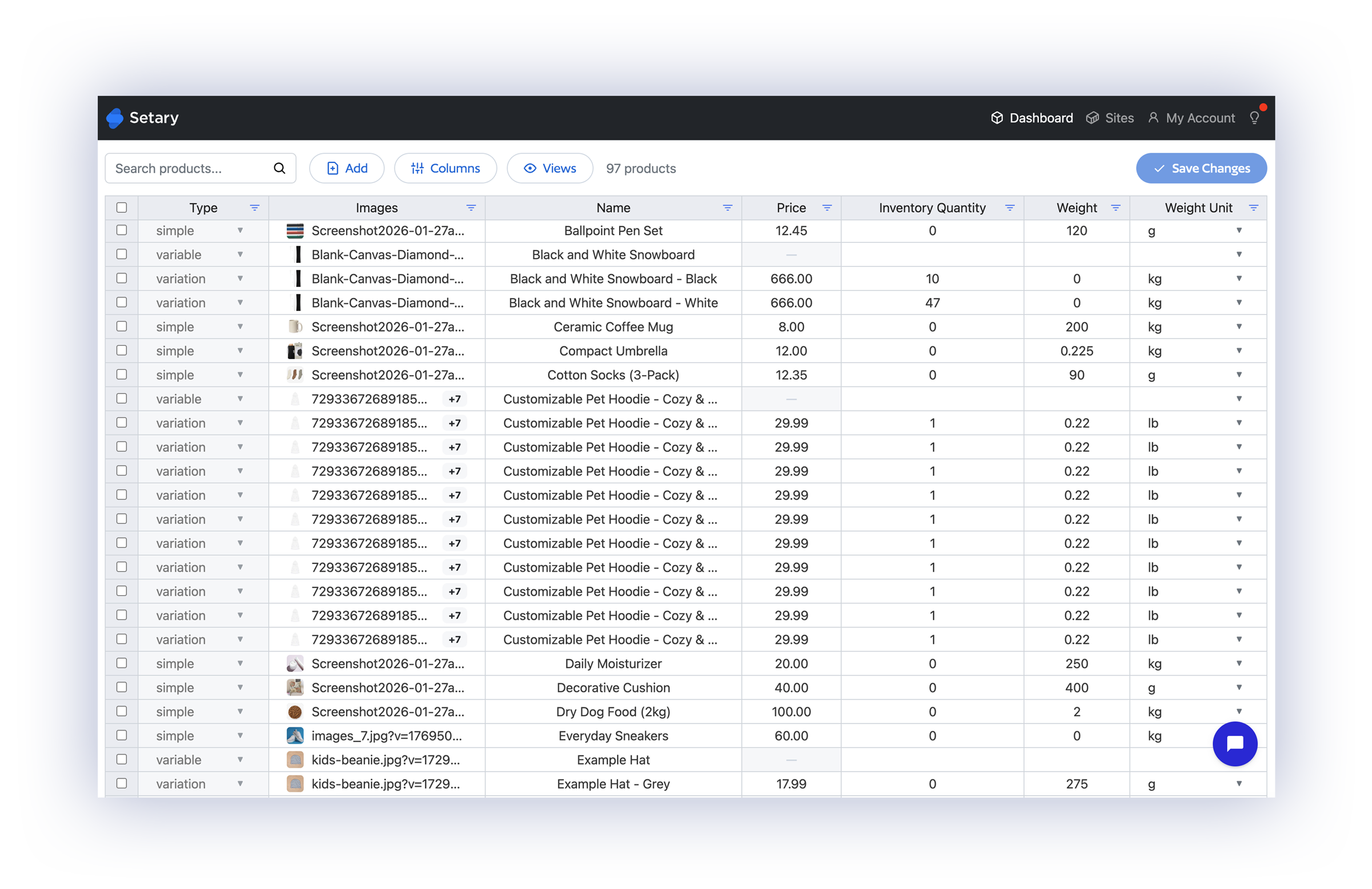
A grid is better whenever the change is not a rule. You might have 40 descriptions to fix one at a time, prices to read against the compare-at price in the next column, or SKUs to check off against a supplier list. Each of those is a separate task in Hextom, or a CSV export and re-import.
Most of the time you are not working from a rule anyway. You are hunting for the products that are wrong, and you do not know which ones they are until you find them.
In a spreadsheet you sort by price, spot the three that say 19.99 where they should say 199.99, and fix them on the spot. To do the same in Hextom you would have to write a condition describing those three products, and you have not laid eyes on them yet.
Choosing the spreadsheet does not cost you the rule-based edits. Setary has bulk actions for those: Set, clear, append, replace, and price changes by a percentage or a fixed amount, applied to whichever rows you have selected.
So you can put every price up by 10% in a few clicks, then go and correct the three that came out wrong, without leaving the grid or opening a second app.
Hextom never shows you a spreadsheet. Setary is one. Our guide to bulk editing Shopify variants goes through the bulk actions in more detail. You can also try the demo for 48 hours if you want to see the grid with dummy products without installing anything.
Setary Does Not Keep a Copy of Your Catalog
Setary talks to Shopify through the API. Your products appear in the spreadsheet because we are reading them live, and an edit you approve goes back the same way. No Setary database holds your catalog, your pricing or your supplier SKUs, and nothing of yours stays behind when you uninstall.
Hextom stores more than that, for a good reason. Every task keeps the old value of each field it changed, and the Revert button reads from those stored values. The App Store listing describes it as “All changes are backed up, allowing bulk edits to be safely reverted”.
That backup lasts 30 days on the free plan, 60 on Basic, 90 on Professional and 180 on Advanced.
Hextom is open about what its revert can and cannot do. Its guide warns that “when a task reverts, the app will use the value that was in the field before the task was run”, even where the price has moved on since. It also tells you to unwind several tasks newest first.
None of that is a criticism. Keeping the old values is the whole mechanism behind the rollback, and a rollback that still works weeks later is worth having. Hextom holds a copy of your data and hands you a safety net in exchange.
Setary holds nothing, so there is no safety net once you sync. You can preview and undo an edit before you make it live, and after that the change belongs to Shopify. If a rollback weeks later is important to you, buy Hextom.
The Same Spreadsheet for WooCommerce and WordPress
Learning one app instead of two is the saving here. The columns, the filters and the bulk actions behave the same whether the row in front of you came from Shopify, from WooCommerce or from a WordPress site. All three sit in the same store switcher, so you move between them in a click.
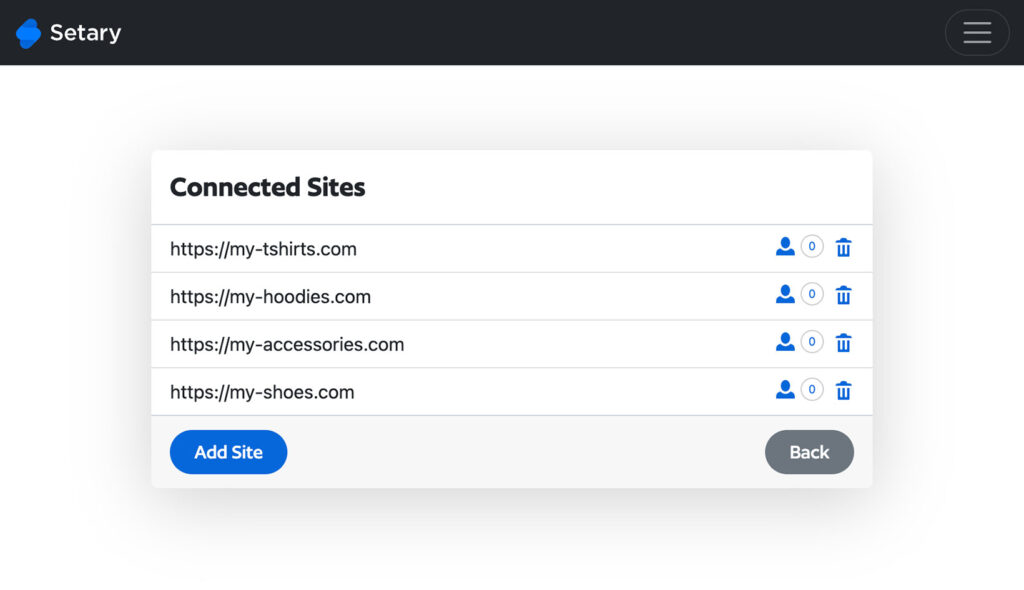
If you look after client stores on both platforms, nobody on your team has to learn a second tool.
Hextom has no WooCommerce or WordPress version. If you sell on both platforms, you will need a separate tool for the other one.
You can connect as many Shopify stores as you like to the same account as well, and send a price change to all of them in one pass.
Shopify bills each install on its own, so Setary comes to $9.99 per connected store: Two stores are $19.98 a month and three are $29.97. Hextom bills per store in exactly the same way, as every Shopify app does.
We charge for the two platforms separately. Shopify is $9.99 a month through the Shopify App Store, and WooCommerce and WordPress start at $144 a year for one site, direct from us. Running both means paying for both, but you still manage every store from a single login.
What Hextom Does That Setary Does Not
- Edits well beyond products – Hextom bulk edits orders, collections, customers and images, on top of products, variants, prices, SKUs and barcodes, tags, descriptions, inventory and metafields. None of that data is available to you in Setary.
- Runs edits while you are asleep – The $19.99 plan holds 10 active scheduled tasks and the $49.99 plan holds 100. Setary has nothing of the kind, so every Setary edit is one you sit and make.
- Undoes an edit long afterwards – A finished Hextom task can be reverted for 30 to 180 days, depending on the plan. Setary cannot reverse anything once you have synced it.
- Never makes you leave Shopify – Hextom works inside the admin you already have open. Setary runs in its own tab at setary.com/app.
- Has the history – Eleven years on the App Store and 1,156 reviews at 4.9 stars. Our WooCommerce editor has been selling for years, but the Shopify app is three months old and nobody has reviewed it yet.
If you need any of these then Hextom is the right choice.
What Setary Does That Hextom Does Not
- Leaves your catalog size out of the price – One pass covers as many products as you have, on the $9.99 plan. Hextom asks $19.99 before a single edit goes past 500 products.
- Gives you a spreadsheet, with the bulk actions as well – Products and variants arrive as rows you can sort, read and type straight into, and the bulk actions run on whichever rows you select. Hextom builds each edit as a form and shows you a preview you cannot change.
- Edits WooCommerce and WordPress as well – The same spreadsheet works across all three platforms from one login. Hextom is Shopify only.
- Keeps no copy of your products – Setary reads and writes through the Shopify API and stores nothing of yours. Hextom holds the old values behind every task so that it can revert them.
The product limit is the biggest factor for most merchants. That’s because it’s the only one of the four that changes what you pay.
FAQ
Is Setary cheaper than Hextom?
No. Both apps start at $9.99 a month and both bill per connected Shopify store. What differs is the size of edit that $9.99 covers, because Hextom’s Basic plan handles 500 products per task and Setary has no product limit.
How many products can Hextom edit at once?
It depends on the plan. The free Demo plan takes 10 products per task, Basic at $9.99 takes 500, Professional at $19.99 takes 5,000 and Advanced at $49.99 takes 50,000. Every plan allows an unlimited number of tasks.
Does Hextom have a spreadsheet view?
No. Hextom works through a form: You write conditions to find the products, pick a field and a rule, then run the task. The only list it shows you is a read-only preview of what your conditions matched. Setary puts the catalog itself in an editable grid, and keeps the bulk actions for rule-based changes.
What happens if my catalog is bigger than Hextom’s limit?
You split the edit into batches and build each one as a separate task, or you move up a plan. A catalog of 2,000 products needs four tasks on the $9.99 plan and one on the $19.99 plan.
Can I undo a Setary edit after it goes live?
You can preview and undo changes before you push them to your store. Once your edits have synced with the live store there is no rollback. Hextom is stronger on this point, because it reverts a finished task for 30 to 180 days depending on the plan.
Does Hextom work with WooCommerce?
No. Hextom builds Shopify apps only, and all 13 apps in its suite are Shopify apps. Setary edits Shopify, WooCommerce and WordPress stores from one login, on separate subscriptions.
Does Setary have a 500-product limit like Hextom Basic?
No, and there is no larger limit further up either, because there is only one plan. Our Shopify FAQ puts it as “You can edit an unlimited number of Shopify products and variants.” Variants are not counted separately.
Is there a free version of either app?
Hextom has a permanent free Demo plan, capped at 10 products per task, which is enough to see how the app behaves. Setary has no free tier. Instead you get a 7-day trial from the Shopify App Store with a 30-day money-back guarantee, or a 48-hour demo store that needs no install and no card.
Choose the Bulk Editor That Fits Your Catalog
Hextom is the app to buy if your edits go past products and variants, if you want them running to a schedule, or if you want to undo one weeks after the event. Eleven years and 1,156 reviews are behind it, and this page does not argue with any of that.
Setary is the app to buy if you would rather work in a spreadsheet. Your products open as rows you can read, sort and type into, and the bulk actions are there for the changes a rule can make. There is no limit on how many products you touch at a time, and all of it costs $9.99 a month.
The quickest way to decide is to think back to your last sale. If you changed fewer than 500 products, either app will do the work at the same price, so pick the one whose way of working you prefer.
If you changed more than 500, Hextom has you batching the edit or paying $19.99 a month to avoid it. The Setary pricing page shows what the $9.99 covers. We have also compared Setary against Ablestar, Matrixify and Mixtable.
Bulk edit anything in WordPress, WooCommerce and Shopify
Try our demo now and discover how you could save thousands of hours managing your site.
or try the demo